What the OnlyFans Photo Generator does
Content creators on subscription platforms spend real time and money on lighting, styling, and editing to get that premium, magazine-quality look. An AI edit of a photo you already have is a faster starting point. Upload your own photo and describe the mood you want in the instruction, and it rebuilds it as a seductive, provocative boudoir shot: flattering low light, an intimate setting like a bedroom, and by default revealing lingerie and a posed, sultry stance. It's for adults editing their own photos only, never images of anyone else. The default is suggestive rather than nude, and you can soften it (a robe, a studio backdrop) through the instruction. This tool isn't affiliated with or endorsed by OnlyFans or any specific platform; the name reflects the aesthetic people search for.
See a sample result
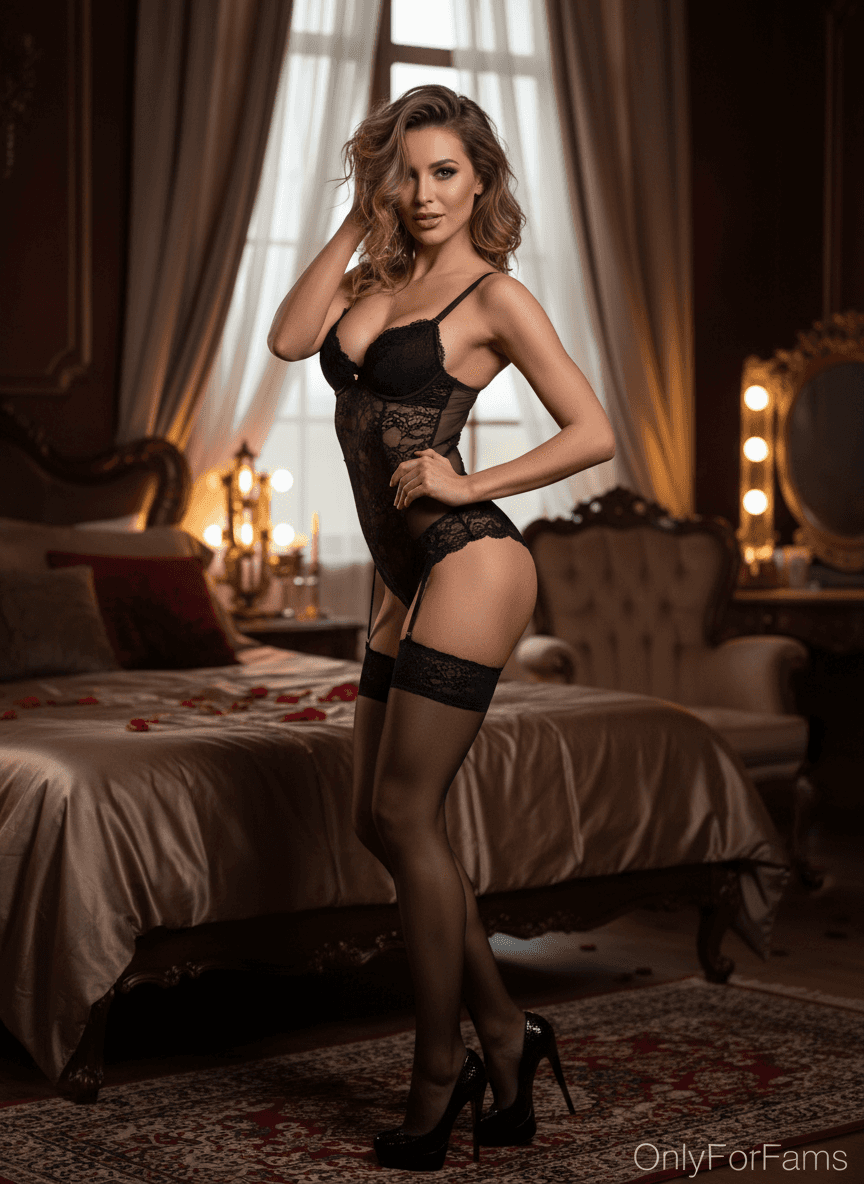
Input: A full-length photo of an adult woman with shoulder-length wavy hair, standing in jeans and a sweater against a plain wall, taken by a friend in simple indoor light, with the instruction left at its default. The result looks similar to the image at the top of this page.
The edit rebuilds the scene as an ornate bedroom at dusk: satin bedding scattered with rose petals, sheer curtains, a tufted armchair and a vanity mirror ringed with bulbs. The sweater and jeans are replaced by a sheer black lace bodysuit with garters, stockings and black heels, and she now stands in a posed, provocative stance with one hand in her hair and the other on her hip. Warm, low light gives the skin a soft glow.
What to check: the body, pose and outfit are invented, and the face is smoothed toward a generic glamour look, so compare it with your original. The AI also added watermark-style text in the corner that imitates a platform logo; crop it out, since it's invented and implies an affiliation that doesn't exist. Many creator platforms have rules about disclosing AI-edited images, so check them before posting.
How it works
- 1
Upload your own photo
Use a clear, well-lit photo of yourself. Full-body or three-quarter shots give the AI more to work with than a tight close-up when applying a styled setting.
- 2
Describe the mood in the instruction
Name the style you want: soft glamour, moody boudoir, bright and airy, or a specific outfit or color. The instruction controls tone, lighting, and setting.
- 3
The AI applies the styled edit
It relights the photo, places you in an intimate setting like a bedroom, and usually swaps your clothes for lingerie and redraws the pose and body. Say what to keep in the instruction if you want less changed.
- 4
Review before you post anywhere
Check the result closely, especially your face, hands, and any text or logos, since generative edits can shift small details. Adjust the instruction and run it again if needed.
Use cases
Building a content preview before a shoot
Creators planning a themed set can preview lighting and setting ideas on their own reference photo before booking a photographer or renting a space.
Refreshing an existing photo's styling
Take a plain photo you already have and give it a more polished, professional-photography look for a subscription gallery, without a full reshoot.
Testing a theme or setting idea
Curious how a specific mood, like a moody bedroom set versus a bright studio look, would work for your brand. Try both on the same photo and compare.
Creating consistent styling across a set
Reuse the same instruction on several of your own photos, one run per photo, to keep lighting and setting consistent across a themed set. Each run uses credits.
Tips for better results
- Start with a clear, well-lit photo of yourself; a poor base photo limits how convincing the styled result looks.
- Be specific in the instruction about lighting, setting, and outfit rather than leaving it vague.
- Check faces and hands closely after generating, since these are the details most likely to shift.
- To compare moods, run the same photo with a different instruction each time; each run uses credits.
- Keep your content in line with the terms of whatever platform you plan to post to; this tool doesn't guarantee platform compliance.
Limitations
This tool is for adults editing their own photos only. The default result is revealing and suggestive, lingerie-level rather than nude, and the image models run their own safety filters, but that is not a reason to test the limits. Never use it on images of anyone without their clear consent, or of anyone who is or appears to be a minor. Generative edits can alter small details like facial features, hands, or proportions, so review every result closely before using it anywhere. A styled photo is not a guarantee of how content will perform on any platform, and you're responsible for making sure anything you post follows that platform's own content and age-verification rules. This page and tool are not affiliated with, sponsored by, or endorsed by OnlyFans or any other platform.
Frequently asked questions
Do I need to be an OnlyFans creator to use this?
No. It's a photo styling tool for the boudoir look associated with subscription platforms, and you can use it for any adult content of yourself where that style fits, following the rules of wherever you post.
Can I use it to edit photos of someone else?
No. It's meant for editing your own photos with your own consent. Don't upload photos of other people without their explicit permission.
Does it generate explicit or nude images?
It isn't designed to. The default aims for a seductive lingerie and boudoir look, which is revealing but not nude, and the image models' safety filters usually block nudity, but results aren't guaranteed. If you want something softer, such as a robe or a fully clothed glamour shot, say so in the instruction.
Is this affiliated with OnlyFans?
No. This tool and page are not affiliated with, sponsored by, or endorsed by OnlyFans or any other creator platform. The name only describes the photo style people search for, and any logo-like text the AI draws into an image is invented and should be removed.
Will the styled photo look exactly like a professional shoot?
It gets you closer to that look starting from your own photo, but it's an AI edit, not a substitute for professional lighting, makeup, and a photographer. Treat it as a fast draft, not a final campaign asset.
Can I control the outfit or setting?
Yes, name the outfit, color, or setting you want in the instruction. The AI applies what you describe rather than a single fixed style.
Plans start at $9 a month. See pricing