AI Doctor Photo Generator
Upload a photo and get it restyled into a doctor-themed portrait for costumes, avatars and creative projects.
What the Doctor Photo Generator does
Maybe you need a quick image for a costume party invite, a school project about careers, or a playful profile picture that puts you in scrubs and a white coat. This tool takes a photo you upload and restyles it with medical-setting details: a lab coat or scrubs, a stethoscope, and a clinical backdrop like an exam room or operating suite. It works from a single photo and gives you one result per run. The output is a styled portrait, not a real photograph, and it should never be used to suggest you hold a medical license or credential you don't have.
See a sample result
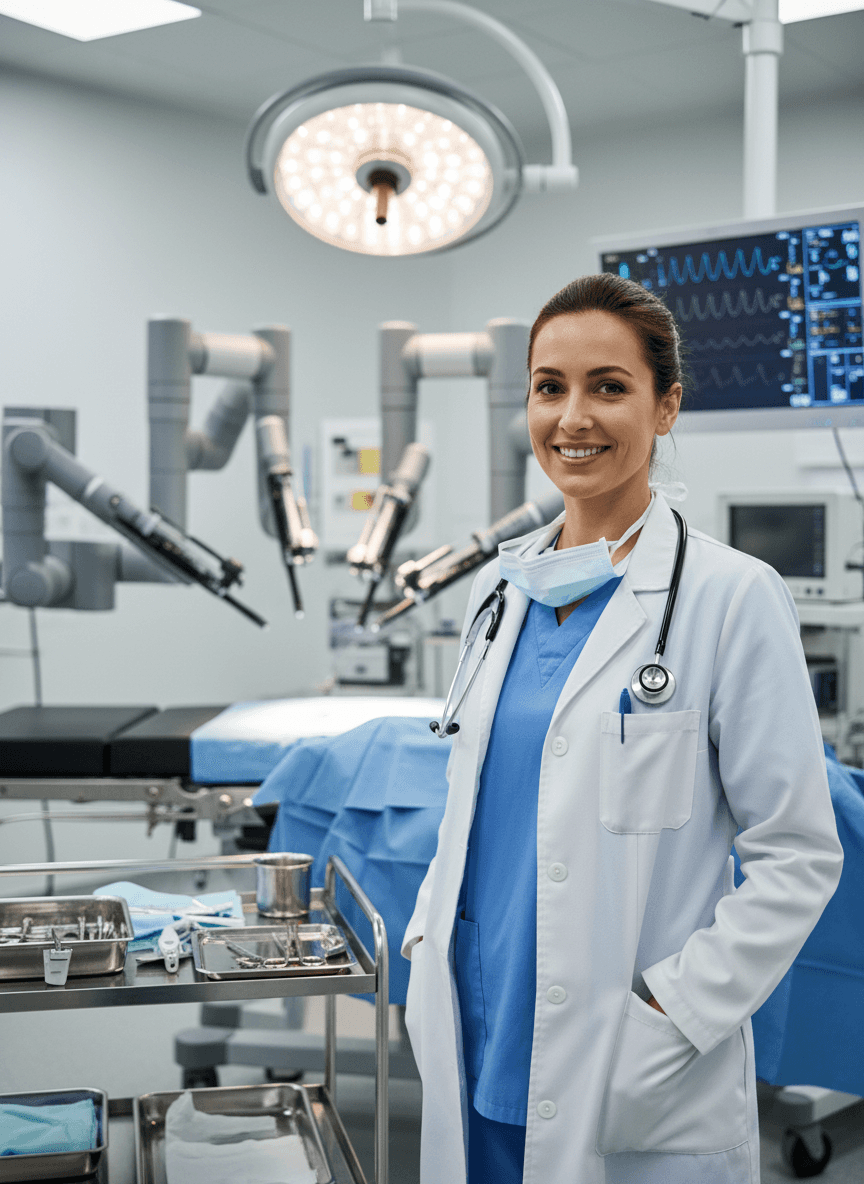
Input: A waist-up phone photo of a smiling woman with dark hair pulled back, wearing a plain sweater, taken indoors in normal room lighting. The result looks similar to the image at the top of this page.
The result places the subject in a modern operating room. She wears a white lab coat over blue scrubs with a stethoscope around her neck, a surgical mask pulled down to her chin and a pen in the breast pocket, standing near a cart of instrument trays. Overhead, a large circular surgical light and several robotic surgical arms fill the room, and a monitor with made-up waveforms glows in the background. She smiles, with one hand tucked into a coat pocket. The skin is smoothed and the face slightly idealized, so compare it with your original. This is a styled illustration, not a real clinical photo: check the face for warping, check that the stethoscope hangs naturally, and don't use an image like this to suggest medical credentials that aren't real.
How it works
- 1
Upload a clear photo
A front-facing photo with good lighting and an unobstructed face gives the AI the most to work with. Shoulders-up or half-body shots both work.
- 2
Edit the instruction if you want a specific look
The default instruction adds a white coat or scrubs, a stethoscope, and a clinical setting. You can rewrite it to ask for a specific coat color, a hospital hallway instead of an operating room, or a different expression.
- 3
Run the generator
The AI merges your photo with the medical styling in one pass. Each run uses credits and produces a single image.
- 4
Review the result
Check the face, hands, and any text on badges or equipment before you use the image anywhere, since generative edits can distort small details.
Use cases
Costume or theme party invites
Create a doctor-themed image for a party invitation or event flyer without renting a costume.
Career day or school projects
Give a kid's school presentation about careers a fitting visual without a real hospital visit.
Novelty avatars and social posts
Use it for a one-off profile picture or a joke post among friends, clearly framed as a costume or edit.
Concept art for scripts and stories
Writers and hobbyist illustrators can use the result as a quick visual reference for a doctor character.
Tips for better results
- Use a photo with even, front-facing lighting so the coat and stethoscope render cleanly around the neck and shoulders.
- Name a specific setting in the instruction, like 'exam room with an eye chart' or 'hospital hallway', if you want something other than an operating room.
- Ask for a specific coat color or add a name badge in the instruction, but expect any small text to come out misspelled or garbled.
- Avoid photos where hands are doing something complex; hands near medical equipment are one of the first things to look distorted.
Limitations
The result is never a real medical credential, license, or verification of any kind, and it must never be used to impersonate a doctor, nurse or other medical professional, present false credentials, or suggest you're authorized to give medical advice or treatment. It's a styled photo edit for costumes, avatars and creative projects only. The AI can add or misspell text on badges and equipment, distort hands and small objects, and it changes the background and clothing while trying to keep your overall likeness, so always check the result before sharing it.
Frequently asked questions
Can I use this to make a fake ID badge or medical credential?
No. The tool produces a styled photo edit, and it must not be used to create or imply real medical credentials, licenses, or hospital ID badges.
Will the result look exactly like a real hospital photo?
It aims for a clinical look with a coat, stethoscope and medical setting, but it's a generative image, not a photograph, so lighting, equipment and small details are approximations.
Can I change the setting from an operating room to something else?
Yes. Edit the instruction to name a different setting, like a clinic exam room or a hospital hallway, and the AI will use that instead.
Does it keep my face the same?
It usually keeps your overall likeness, but generative edits can subtly change facial details, so check the result before using it anywhere.
How many photos can I upload at once?
You can upload multiple images and the tool uses them all as references for a single result; it doesn't produce a separate image per photo, and credits are charged per image.
Is this appropriate for a professional profile picture?
No. For an actual work profile, use a real headshot. This tool is meant for costumes, novelty images and creative projects, not professional identity.
Plans start at $9 a month. See pricing