Outfit Description Generator
Turn a photo of clothing into listing copy you can paste straight into a post or resale page.
What the Outfit Description Generator does
Staring at a photo of a top you need to list and not knowing how to describe it without sounding like a spec sheet is a common snag for resellers, stylists, and anyone posting an outfit online. This tool looks at a clothing photo, whether it's one item on a hanger or a full outfit on a person, and writes flowing, sellable copy: what the piece is, its color and fabric, the fit, and the occasion it suits, followed by a short style-tag line. It's built for resale listings, style posts, and thrift or consignment photos where you need copy fast and don't want to write it from scratch every time.
See a sample result
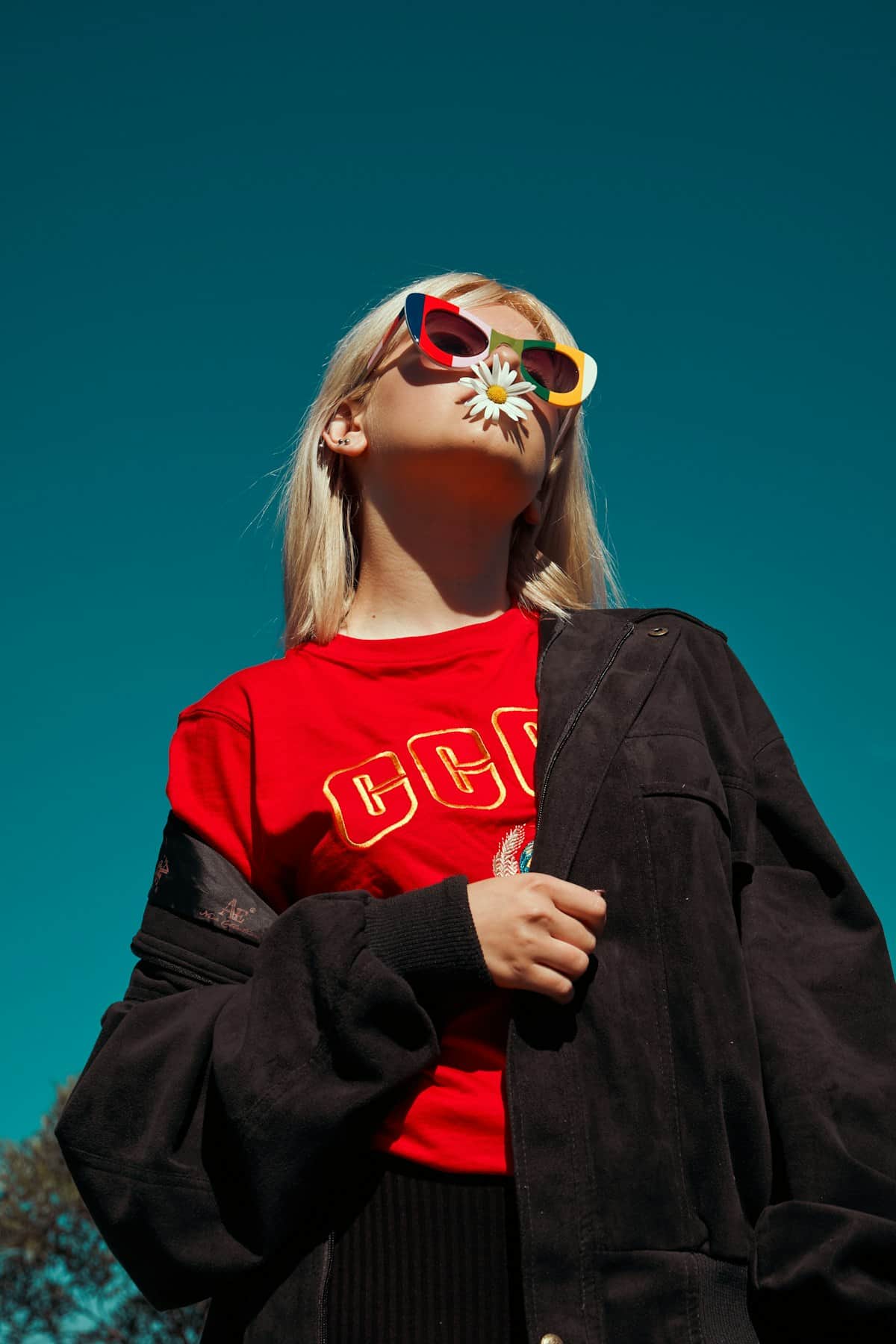
Input: A low-angle photo against a teal sky of a woman with blonde hair, wearing colorful novelty sunglasses and holding a daisy in her mouth. She wears a red crew-neck T-shirt with yellow block lettering reading "CCCP" across the chest, an oversized black suede or leather jacket worn off the shoulders, and dark-colored bottoms.
Top: A red crew-neck T-shirt with bold yellow block lettering spelling out "CCCP" across the chest, a graphic tee with retro, statement-making energy.
Outerwear: An oversized black jacket in a soft suede or leather finish, worn pulled down off both shoulders for a relaxed, undone layer over the tee.
Bottoms: Dark-colored bottoms complete the look, kept simple so the graphic tee and jacket stay the focus.
Accessories: Colorful, novelty-style sunglasses add a playful pop against the outfit's darker palette.
This look leans street-style and a little rebellious, built around a bold graphic tee and an oversized jacket worn off the shoulder for an easy, undone finish. It suits a casual day out, a concert, or any occasion calling for a statement top over simple layers. Style it with boots or chunky sneakers to keep the attitude going from head to toe.
#streetstyle #graphictee #offtheshoulder
Condition notes: garments appear unworn and intact in the photo; check stitching and fabric condition in hand before listing.
How it works
- 1
Upload a clear photo of the clothing
A single garment on a hanger, a flat lay, or a full outfit on a person all work. Even lighting and a plain background make colors and fabric easier to read.
- 2
Add notes in the details box if useful
If you know the brand, size, or fabric and want it mentioned, add it in the details box; the tool only writes what it can see unless you tell it more.
- 3
The model identifies each visible piece
It reads garment type, color, texture, and fit, then infers a likely occasion, casual, work, evening, or athletic, based on the overall look.
- 4
Get listing-ready copy and a style-tag line
You get two to three sentences of upbeat, wearable description plus a short line of hashtag-style style tags summarizing the aesthetic.
Use cases
Resale and thrift listings
Photograph an item from your closet or a thrift find and get copy ready to paste into a resale marketplace listing without writing it line by line.
Small boutique or consignment shops
Run each photo of incoming inventory through the tool and get a consistent tone across listings instead of copy that varies by whoever wrote it that day.
Style and outfit-of-the-day posts
Turn a mirror selfie or outfit photo into a caption that names what you're wearing and the vibe it's going for, ready for a social post.
Wardrobe or closet cataloging
Run a photo of each piece to build out a written record of what you own, useful when planning outfits or deciding what to sell.
Tips for better results
- Photograph one focal garment clearly if a rack or closet has several items in frame, since the description centers on what's most visible.
- Good, even lighting helps the model read color accurately; a top lit half in shadow can come back described as a darker or duller shade than it is.
- Mention brand, size, or fabric content in the details box if you want it included, since the tool can only describe what's visible or what you tell it.
- For resale listings, always check the item in hand for wear, stains, or damage the photo doesn't show; the description reflects only what's visible in the image.
- If the result leans too casual or too formal for your platform, add a note about the intended audience or occasion and regenerate.
Limitations
The description is based only on what's visible in your photo. It can't confirm brand names, fabric content, or true garment condition, and lighting or camera angle can shift how a color or texture reads. For resale and consignment listings, make sure the photo and any written description match exactly what a buyer will receive, including any wear, alterations, or flaws not visible in the shot.
Frequently asked questions
Does it work if the photo shows clothes on a rack instead of a person wearing them?
Yes. It reads garments however they're photographed, whether flat, hung, or worn, and describes whichever piece is clearest in the frame.
Can it name the brand of the clothing?
Only if a visible logo or tag makes it obvious, or if you type the brand into the details box. It won't guess a brand from style alone.
Will it mention flaws like stains or pilling?
It can note visible wear if the photo shows it clearly, but always inspect the actual garment yourself before listing, since photos can hide small flaws.
Can I get a different tone, like more formal or more casual?
Yes, add a note in the details box describing the tone or platform you're writing for, and the description will adjust to match.
Does it write a full outfit description or just one item at a time?
It describes whatever is clearest in the photo. For a full outfit with multiple visible garments, it covers each piece; for a single item, it focuses there.
Can I use the output as-is on a marketplace listing?
Most people paste it in with light edits, adding size, price, or shipping details the tool has no way to know from a photo alone.
Plans start at $9 a month. See pricing