AI Furry Generator
Turn a photo into an anthropomorphic animal character with a face, outfit, and pose built around you.
What the Furry Generator does
A furry character, or fursona, takes a person and reimagines them as an anthropomorphic animal: an animal head and features on a human-like body, styled and posed like character art rather than a costume photo. This generator takes your photo and builds that character around it, choosing an animal type, fur coloring, and outfit that echo details from the original image, then rendering the whole thing in a clean, illustrated art style. It's built for people who want a fursona started from their own likeness rather than from scratch, or who just want to see themselves reimagined as a stylized animal character for fun, an avatar, or a piece of fan art.
See a sample result
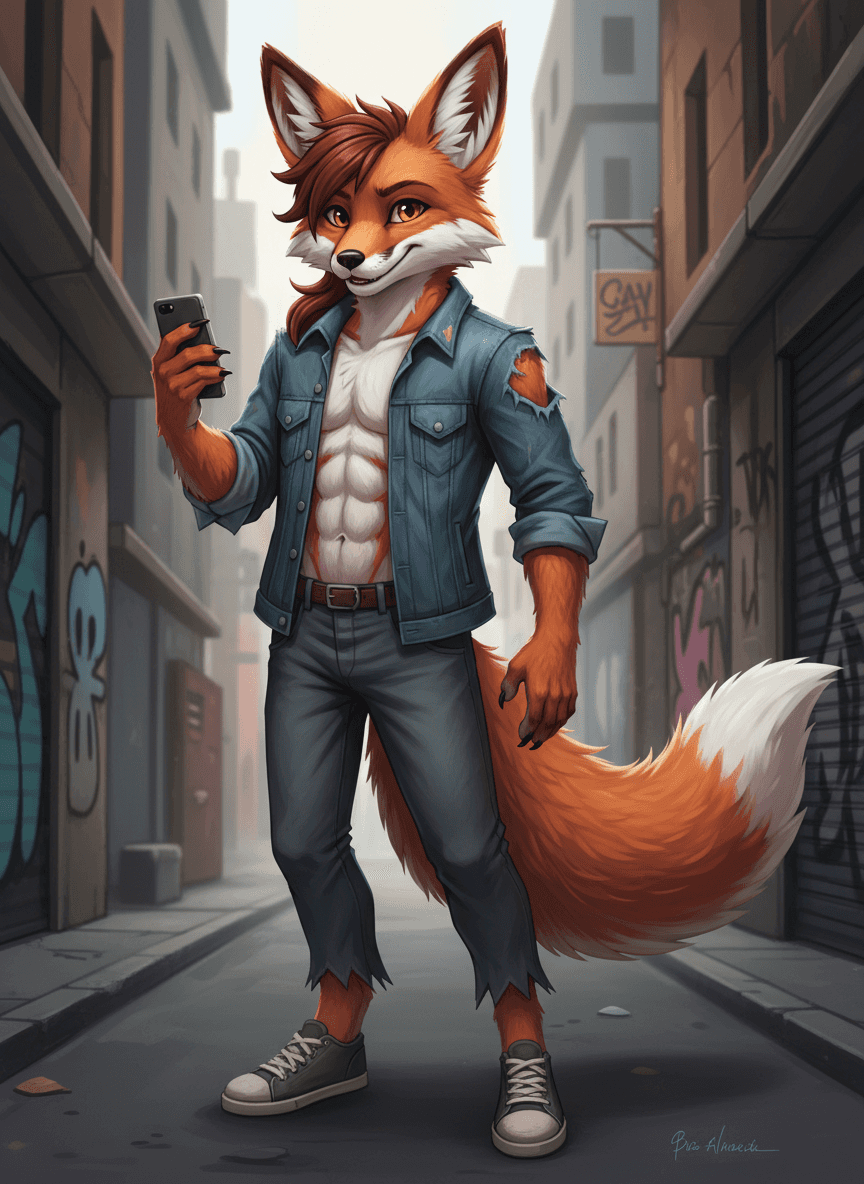
Input: A full-length photo of a man with reddish-brown hair in an open denim jacket, dark jeans, and green sneakers, taking a selfie on a city street. The result looks similar to the image at the top of this page.
The character
The generator builds an anthropomorphic fox character, matching the reddish-brown hair tone into the fox's fur coloring, with a lighter cream underbelly and muzzle. Sharp amber eyes and an easy, confident half-smile carry over the personality of the original pose rather than a blank stock expression.
Outfit and setting
The character wears a worn denim jacket left open over a plain top, paired with jeans and casual sneakers, a translation of everyday streetwear into the fursona's look. The pose holds a phone up as if mid-selfie, set against a moody, graffiti-lined alley background that gives the piece a lived-in, urban feel rather than a plain studio backdrop.
Style notes
The linework and shading sit in a clean digital illustration style, with detailed fur texture around the ears, tail, and jawline, the kind of finish typical of character art made for an avatar or profile piece rather than a quick sketch.
How it works
- 1
Upload a clear photo of yourself
A photo with your face, hair, and general outfit visible gives the generator the most to work with when choosing an animal type and character style.
- 2
The AI picks an animal base and fur styling
It maps your general coloring, hair, and features onto an anthropomorphic animal design, choosing a species, fur pattern, and eye color that feel like a natural translation rather than a random pick.
- 3
Clothing and pose get built around the character
The result includes an outfit and a confident pose, styled like character art meant to represent a fursona rather than a simple filter over your face.
- 4
You get a finished character illustration
The output is a single stylized image of your furry character. If the species or styling isn't what you pictured, name the animal and look you want in the instruction and run it again.
Use cases
Starting a fursona from scratch
If you don't already have a fursona design, generating one from your own photo gives you a starting character to refine, rename, and build a personality around.
Avatars and profile pictures
A finished furry character illustration works well as an avatar for gaming, art, or community platforms where a fursona is the norm.
Gifts for furry fandom friends
Generate a character based on a friend's photo as a personalized, low-effort gift or surprise for someone active in the fandom.
Exploring different species or styles
Run the same photo through more than once to see how different animal types and color palettes change the feel of the character before committing to one.
Tips for better results
- Use a photo with good lighting and a clearly visible face so hair and coloring translate accurately into the fur design.
- A photo that already shows some personality in the pose or expression tends to carry over into a more distinct character.
- If you want a specific animal, say so in the instruction, for example 'red fox with a white-tipped tail' or 'snow leopard with teal eyes'.
- Generate a second version if the first doesn't feel right; species and styling vary between runs, and each run uses credits.
- Avoid heavily filtered or low-resolution source photos, since fine detail like hair color and texture affects the fur styling.
Limitations
This tool is for entertainment, fan art, and fursona creation. Results are stylized character illustrations, not literal representations of you, and the AI's choice of species, coloring, and outfit is a creative interpretation rather than anything meaningful about the person in the photo. It's built for general audiences and general-audience character art.
Frequently asked questions
Can I choose which animal my character becomes?
Yes. There's no dropdown, but the instruction is editable, so write the species, fur colors, and outfit you want. Left as is, the AI picks an animal from cues in your photo.
Is this the same as a furry fursuit photo?
No, this generates an illustrated character image, not a photo of you in a costume. It's closer to commissioned fursona art than a costume photo edit.
Can I use the result as my fursona going forward?
Plenty of people do use a generated character as a starting fursona, then build a name, personality, and backstory around it, or commission an artist to refine the design further.
Will the character actually look like me?
It carries over general cues like hair color, coloring, and outfit style, but the final result is an animal character, so it won't resemble your face directly the way a filter would.
Does it work with a full-body photo or just a headshot?
Both work. A full-body photo gives the generator more to work with for outfit and pose, while a headshot focuses the result more on the face and coloring.
Is the furry generator appropriate for all audiences?
The default instruction asks for general character art, and that's what it's meant for. It isn't a tool for explicit or adult furry content.
Plans start at $9 a month. See pricing