Cartoonify
Turn a regular photo into a bright, big-eyed cartoon version of the subject.
What the Cartoonify does
Somewhere between a filter and an illustration, cartoonifying a photo turns a normal picture into something that looks hand-drawn, with rounder features, bolder outlines, and colors pushed toward the vivid end. This tool does that in one pass: upload a photo of a person, pet, or anything with a clear subject, and it comes back reworked as a cartoon character. It's built for profile pictures, stickers, group chat avatars, or just seeing what you'd look like as an animated character. You can adjust the instruction if you want a specific cartoon style rather than the default look.
See a sample result
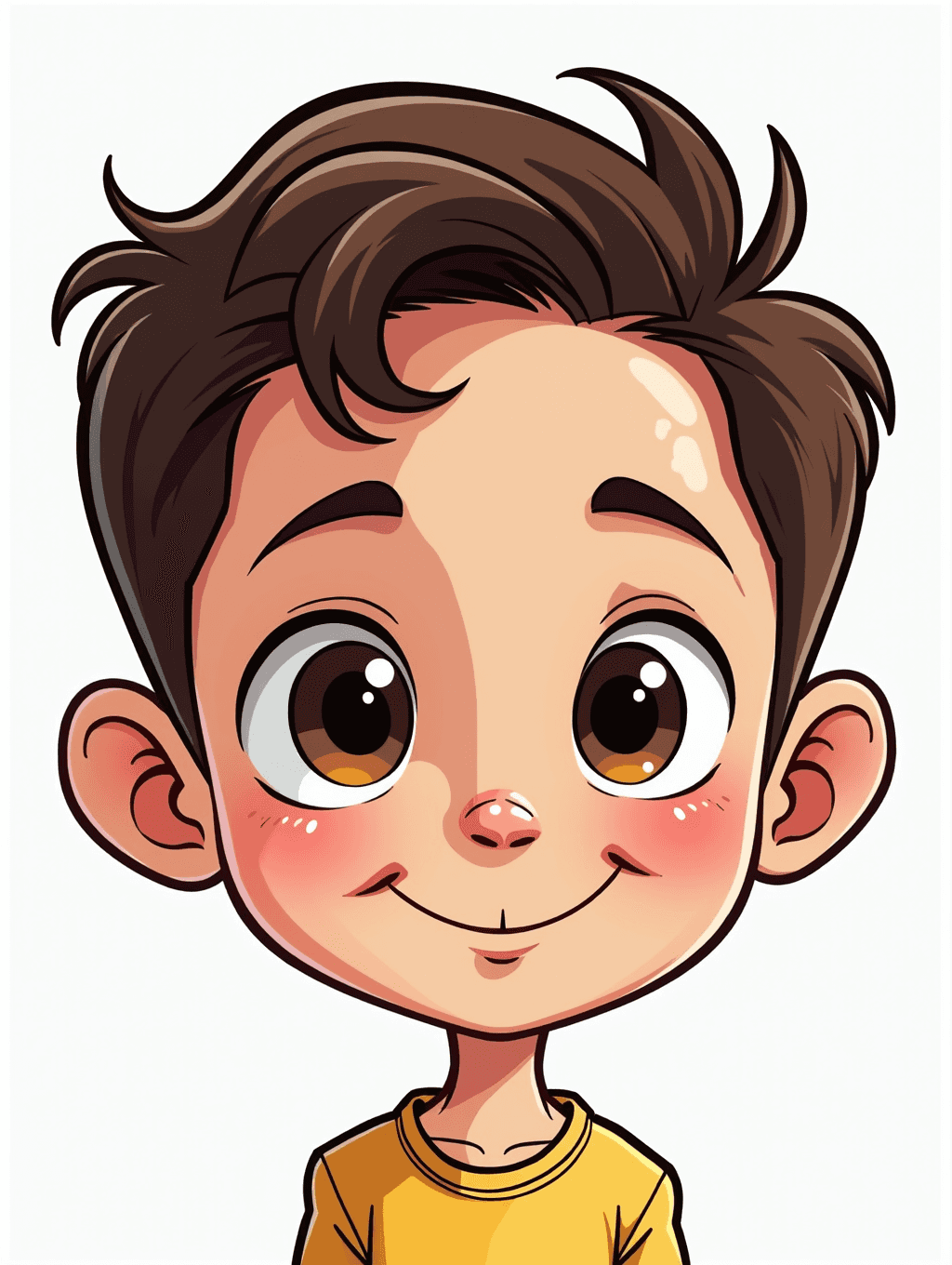
Input: A close-up, front-facing phone photo of a young boy with messy brown hair and a slight smile, wearing a mustard-yellow t-shirt against a plain light wall. The result looks similar to the image at the top of this page.
Style applied: Bright, big-eyed cartoon character
The boy's features were simplified and rounded into a classic animated-character look: enlarged eyes with visible catchlights, a small simplified nose, and a soft, rosy-cheeked complexion. His hair was redrawn with clean, swooping outlines instead of individual strands, and the plain background was replaced with a flat, light tone that keeps the focus on the character.
What changed
- Eyes enlarged and simplified with bold outlines and bright highlights
- Hair redrawn as smooth, stylized shapes rather than fine detail
- Skin shaded in flat tones with soft pink cheeks instead of realistic texture
- Outfit color brightened and outlined to match the overall cartoon style
What stayed recognizable: The boy's general hair color, hairstyle, and expression carried through, along with the yellow t-shirt, so the cartoon still reads as a version of him. The ears came out larger than in the photo, a common cartoon exaggeration.
How it works
- 1
Upload a photo with a clear subject
A photo where the face or main subject is in focus and takes up a good portion of the frame gives the cleanest cartoon result. Busy backgrounds get simplified along with everything else.
- 2
Add style notes if you want
The instruction box is editable, so you can ask for a specific look, like a particular color palette, a certain cartoon era, or exaggerated features, on top of the default cartoon style.
- 3
The AI redraws the photo as a cartoon
It simplifies facial features, adds bold outlines, flattens shading into blocks of color, and pushes the palette toward brighter, more saturated tones, the way an animated character is built rather than a photorealistic one.
- 4
Download your cartoon version
You get back an image styled as an animated character, ready to use as an avatar, sticker, or just to see the reimagined version of your photo.
Use cases
Making a fun avatar for chat apps or gaming
A cartoon version of yourself stands out more in a group chat or game profile than a straight photo, without needing any drawing skill.
Turning a pet photo into a character
Cartoonify a photo of your dog or cat for a sticker, a print, or a fun profile picture that still reads as your specific pet.
Custom stickers and prints
A cartoonified photo works well as a base for a printed sticker, mug, or small gift, since the bold outlines and flat colors hold up at small sizes. Check the file size before printing anything large, and upscale it if needed.
Kid-friendly versions of family photos
Turn a family photo into a softer, cartoon-style version for a kid's room, a birthday invite, or a personalized book.
Seeing a different creative take on a photo you like
Not every photo needs to stay realistic. Cartoonifying a favorite shot is a quick way to get a completely different look from the same image.
Tips for better results
- Use a photo where the subject's face is clearly visible and well lit, since the AI needs to read the features it's simplifying.
- Front-facing or near-front-facing photos convert more cleanly than extreme side angles.
- If you want a specific cartoon style, like a particular color scheme or a softer versus bolder outline, describe it in the instruction box.
- Simple backgrounds convert more predictably than busy scenes with a lot of competing detail.
- Try the same photo twice with slightly different instructions if the first result doesn't match the look you had in mind.
- For pet photos, a shot where the animal is looking toward the camera tends to keep its expression recognizable in cartoon form.
Frequently asked questions
Will the cartoon still look like me?
Usually as a stylized version of you. Hair color, hairstyle, and clothing tend to carry through, but the AI redraws every feature, so eye shape, nose, and face width can drift toward a generic cartoon look. A clear, front-facing photo keeps more of your likeness, and you can ask for subtler exaggeration in the instruction.
Can I choose a specific cartoon style?
Yes. The instruction is editable, so you can ask for a particular palette, a bolder or softer outline, or a specific animated look, and that request is applied on top of the default cartoon style.
Does it work on photos of pets or objects, not just people?
Yes, it works on any clear subject, including pets, though results are most predictable when the subject's face or main features take up a good portion of the frame.
Can I upload more than one photo at once?
The tool accepts multiple images per run if you want to combine or compare a few, though a single clear subject photo gives the most straightforward cartoon conversion.
Will small details like text or logos on clothing come through accurately?
Not reliably. Since this is a generative edit, small details like text, patterns, or logos can be redrawn incorrectly or simplified away entirely, so don't rely on it for anything where exact wording matters.
How is this different from a simple cartoon filter app?
A basic filter usually just overlays edges and flattens color on top of the original photo. This redraws the image as a cartoon, changing shading, proportions, and detail rather than layering an effect on top.
Does each cartoonify run cost credits?
Yes, each generation uses credits from your plan the same as any other edit tool, so it's worth picking a good source photo before running multiple variations.
Plans start at $9 a month. See pricing