What the Goth Style Generator does
Committing to a full goth look for one photo, complete with the makeup and wardrobe, takes more effort than most people have on a random afternoon. This tool skips that and restyles a photo directly: dark, dramatic eye makeup, black lipstick, gothic clothing like lace collars or structured black outerwear, and lighting pulled down into moody, low-key shadow. You can name a specific substyle, like romantic, cyber, or pastel goth, in the instruction box, and the result leans into that direction instead of a generic dark filter.
See a sample result
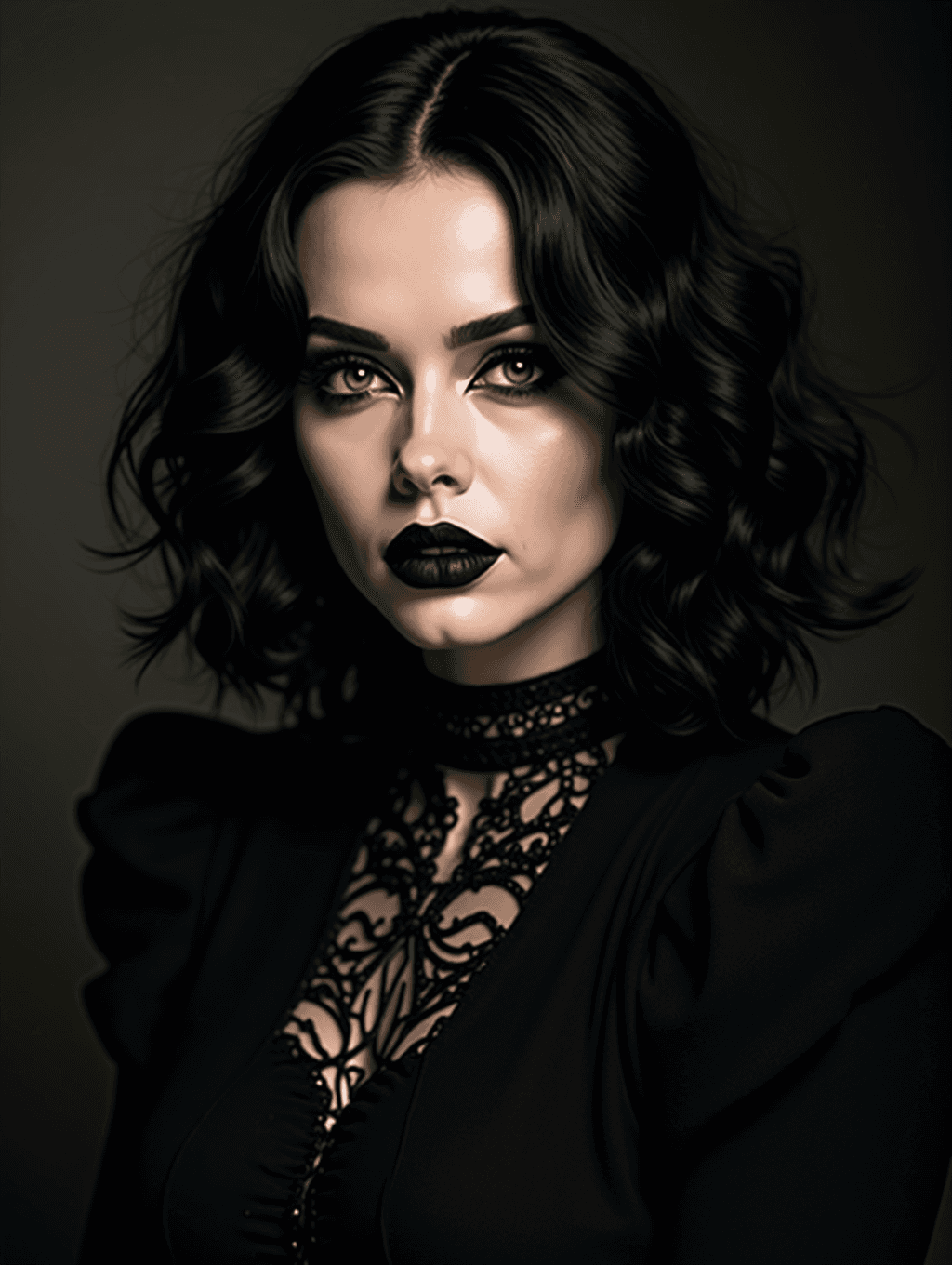
Input: A front-facing portrait taken in natural daylight, showing a woman with wavy, shoulder-length brown hair, light everyday makeup, a plain gray top, and a neutral background. The result looks similar to the image at the top of this page.
The photo now sits in near-total shadow, lit from one side in the low, moody style of a studio portrait rather than a daylight snapshot. Her brown hair turned jet black, styled in glossy center-parted curls that frame the face. Makeup shifts to a heavy, smoky black eyeshadow with sharp winged liner and matte black lipstick, the contrast pushing the eyes and mouth forward against pale, evenly lit skin. Around the neck sits a black lace choker, and the gray top became a black dress with puffed shoulders and a sheer lace panel down the front. The background fades to almost pure black, leaving the face and lace detailing as the only bright points in the frame. The pose stayed close to the original, but the heavier brows, black lips, and redrawn face shape shift the likeness, so compare it with the source photo before you post it.
How it works
- 1
Upload a clear portrait photo
A front-facing shot with visible shoulders and neckline gives the tool room to add collars, lace, or jacket details around the face. You can upload more than one photo per run.
- 2
Name a goth substyle if you have one in mind
Mention romantic goth, cybergoth, pastel goth, or another direction in the instruction box, since the default result leans classic and the style shifts noticeably with a specific request.
- 3
The AI applies makeup, clothing, and lighting
Expect smoky or winged dark eye makeup, black or deep-toned lipstick, gothic accessories like lace or chokers, and the whole scene pulled toward low, moody lighting.
- 4
You get back one restyled image
The result is a single photo in the gothic look. It's a generative edit, so compare the face with your original: heavy makeup plus redrawn features can make it read like someone else.
Use cases
Halloween costume planning
See a gothic version of yourself before committing to real makeup and a costume, or use it as a reference photo to copy the look.
Alt-fashion content and profile photos
Creators running a goth, alt, or dark-aesthetic account can generate consistent styled images without a full physical shoot each time.
Concert or band-themed photos
Get a moody, gothic-styled photo to match a concert night or a band's aesthetic without sourcing the exact wardrobe.
Testing a look before a real makeover
Preview how dark makeup and gothic styling might suit you before booking an actual makeup artist or buying new pieces.
Tips for better results
- Use a photo with visible shoulders and neckline so lace collars and jacket details have room to render.
- Name a specific goth substyle, like romantic, cyber, or pastel, if you want something other than the classic default look.
- Start from a photo with even lighting; the tool pushes lighting toward low and moody, and a well-lit source photo holds up better.
- Avoid heavily patterned original outfits, since simpler starting clothing tends to restyle more cleanly.
- Generate more than one version if the first result leans more toward one substyle than you wanted.
- If you want visible piercings, tattoos, or a specific hair color kept, mention them directly, since the restyle can otherwise override smaller details.
Limitations
This is a generative restyle, not a real makeup or wardrobe change, and it can alter small details like exact hair texture or jewelry patterns while keeping your general likeness. Check the face and any fine lace or jewelry detail in the result, since generated close-up patterns can occasionally look slightly off.
Frequently asked questions
Will it change my actual face shape or features?
It can. The aim is to add makeup, clothing, and lighting while keeping your likeness, but the AI redraws the whole image, so brows, lips, and face shape can drift. Run it again or simplify the instruction if the result stops looking like you.
Can I ask for a specific goth substyle?
Yes, use the instruction box to name romantic goth, cybergoth, pastel goth, or another direction, and the result will lean into that style instead of the default.
Does it work on photos with glasses or piercings?
Often, but not reliably. A generative restyle can drop, move, or redesign glasses and piercings, so name the ones you want kept in the instruction and check the result.
Can I use a photo of more than one person?
It's built around a single clear subject, so a photo with one person centered gives the most consistent result.
Why does my hair look darker or different in the result?
The default goth look usually darkens the hair to black. If you want your own hair color kept, or a different one like deep red, say so in the instruction.
How many credits does a generation cost?
Each run uses credits from your account like the other editing tools on the site, so it's worth checking your balance before generating multiple variations.
Can I use a photo where I'm already wearing dark clothing?
Yes, though the tool will still adjust makeup, lighting, and finer clothing detail to match the requested goth substyle rather than leaving the original outfit untouched.
Plans start at $9 a month. See pricing