Film Noir Aesthetic Generator
Turn a regular photo into a film noir scene, with hard shadows, rain-slicked streets, and the mood of a 1940s detective film.
What the Film Noir Photo Generator does
Film noir has a look you recognize instantly: venetian-blind shadows cutting across a face, a neon sign glowing through rain, a trench coat and a cigarette caught mid-drag in black and white. This tool takes your photo and rebuilds it inside that world. It pushes the image to high-contrast monochrome, adds hard directional shadow, and drops in the period setting, streetlights, cobblestones, a passing car, that makes a shot read like a still from a 1940s detective picture. The wardrobe and pose shift to match, and the mood goes moody and cinematic instead of casual. Upload a photo and get back one styled image built around that noir atmosphere.
See a sample result
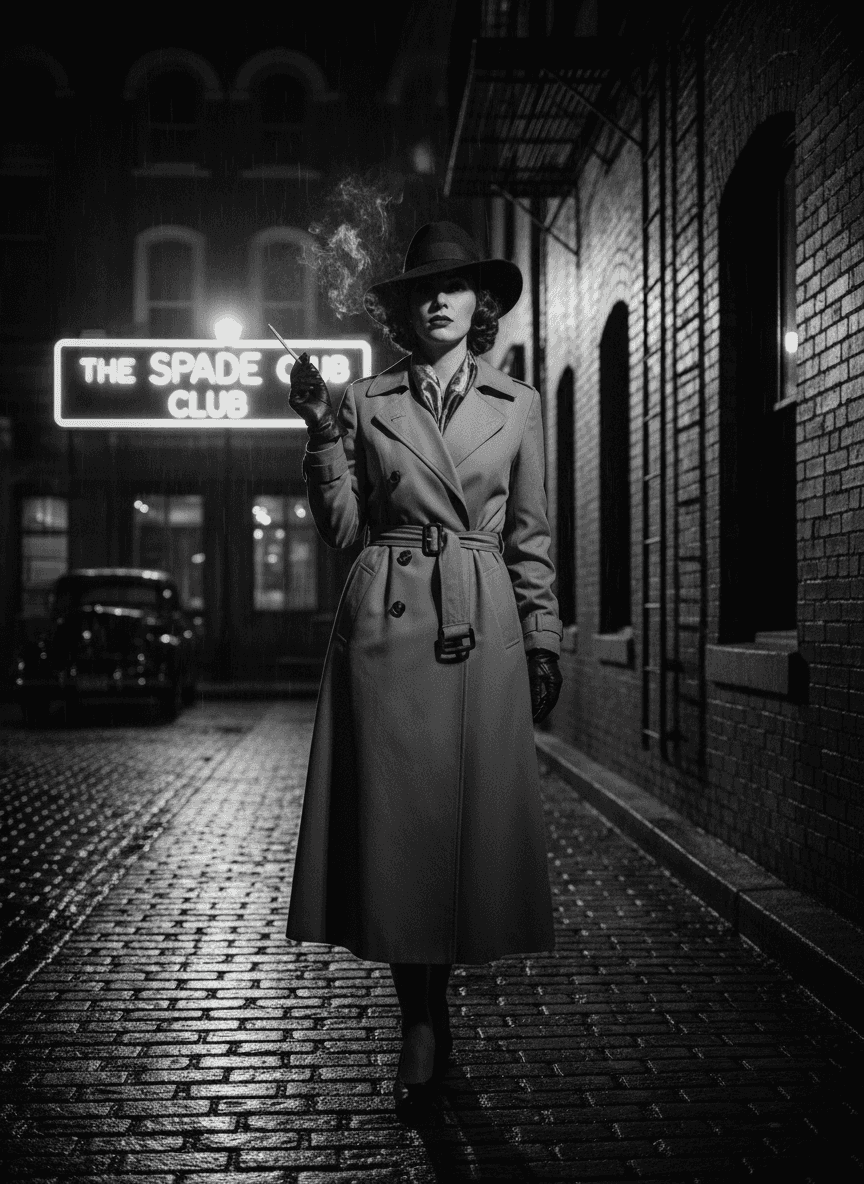
Input: A plain daytime photo of a woman with shoulder-length curly hair in a casual jacket and jeans, standing on a sidewalk, taken in ordinary color with soft, even outdoor light. The result looks similar to the image at the top of this page.
The photo shifts to full black and white with heavy contrast, and the daytime sidewalk becomes a wet brick street at night, lit by a streetlamp and a neon sign. The casual outfit is replaced with a belted, double-breasted trench coat, leather gloves, a patterned scarf at the collar, and a wide-brimmed fedora, and the curls are styled into a 1940s shape under the hat. A lit cigarette with curling smoke is added to her raised hand; if you don't want one, say 'no cigarette' in the instruction. Behind her sit a parked vintage car and a fire escape climbing a brick wall. The neon sign is meant to read 'THE SPADE CLUB', a name the AI invented, but one letter came out garbled, so check any sign text before you post. Her expression turns cool and unsmiling, which fits the genre but differs from the original photo.
How it works
- 1
Upload a photo with a visible face and upper body
A clear, front-on or three-quarter shot gives the tool enough to work with when it restyles wardrobe, lighting, and pose into the noir look.
- 2
The AI shifts the image to high-contrast black and white
Expect deep blacks, blown highlights, and hard-edged shadow instead of the softer, even lighting of a typical photo, mimicking classic film stock.
- 3
Wardrobe and setting shift to the 1940s
Trench coats, fedoras, and period-appropriate props like neon signs, vintage cars, and rain-slicked streets get built into the scene around you.
- 4
You get back one styled photo
The result is a single noir-style image, ready to compare against your original. A clearer starting photo with visible facial features tends to hold up best.
Use cases
Themed profile or social posts
Post a noir version of yourself for a mystery-themed feed, a movie night invite, or just a striking black-and-white profile photo.
Event and party photography
Generate noir-style images for a 1940s or detective-themed party without renting a trench coat or building a set.
Concept art and mood boards
Filmmakers and photographers can use it to preview how a subject or scene would look under noir lighting before planning an actual shoot.
Creative writing and character portraits
Writers building a noir story generate a visual for a detective, femme fatale, or informant character based on a real photo as a starting point.
Tips for better results
- Use a photo with a plain or simple background so the added noir setting, street, signage, shadow, has room to build around you cleanly.
- A slightly angled, three-quarter pose tends to read more cinematic than a straight-on headshot once the shadow work is applied.
- Avoid photos with busy patterns or bright colors, since the tool has more to reinterpret when the starting image is simpler.
- If you want a specific prop or detail, like a hat or a particular sign, name it directly in the instruction rather than the default noir description.
- Check any generated text, like signage, closely, since the AI can misspell words or add logos on its own.
Frequently asked questions
What exactly counts as the film noir aesthetic?
It's the visual style of 1940s and 1950s detective and crime films: high-contrast black and white, hard directional shadow, rain-slicked streets, and wardrobe like trench coats and fedoras, all building a moody, suspenseful mood.
Does it keep my face recognizable, or change my identity?
It aims to keep you recognizable while restyling lighting, wardrobe, and the scene around you. It's a generative edit, so pose and small features can shift. A clear, front-lit starting photo holds up best.
Can I use a photo of two people instead of one?
It's built around a single subject for the most consistent result. Photos with more than one person may still work, but the noir styling holds together better with one clear subject in frame.
Will the output be in color or black and white?
Black and white, high contrast, is the core of the noir look and part of what the tool applies by default. If you want a specific tint or partial color, describe it in the instruction.
Can I ask for a specific prop, like a detective's office or a specific car?
Yes. The instruction is editable, so you can name a setting like 'a smoky detective's office' or 'a 1940s train platform' instead of the default street scene.
Why did the sign or background text come out wrong?
Signage and background text are generated by the AI and can come out misspelled or invented. If exact wording matters, put it in quotes in the instruction and double-check the result before using it publicly.
Plans start at $9 a month. See pricing