Robot Generator
Send in a photo of yourself and get back a cyborg or full-robot version, panels and all.
What the Robot Generator does
Someone asked for a robot costume idea and you'd rather see it on your own face first. Upload a photo of yourself and the AI rebuilds it with mechanical parts: metallic paneling worked into the skin, exposed joints or wiring where a shoulder or jaw would be, and a cool, tech-lit finish over the whole scene. How far it goes depends on what you ask for, from a light cyborg implant near an eye to a full plated robot body. You end up with one image, styled the way a sci-fi movie still would look, and it's meant for costume ideas, profile pictures, and character concepts rather than any real robotics.
See a sample result
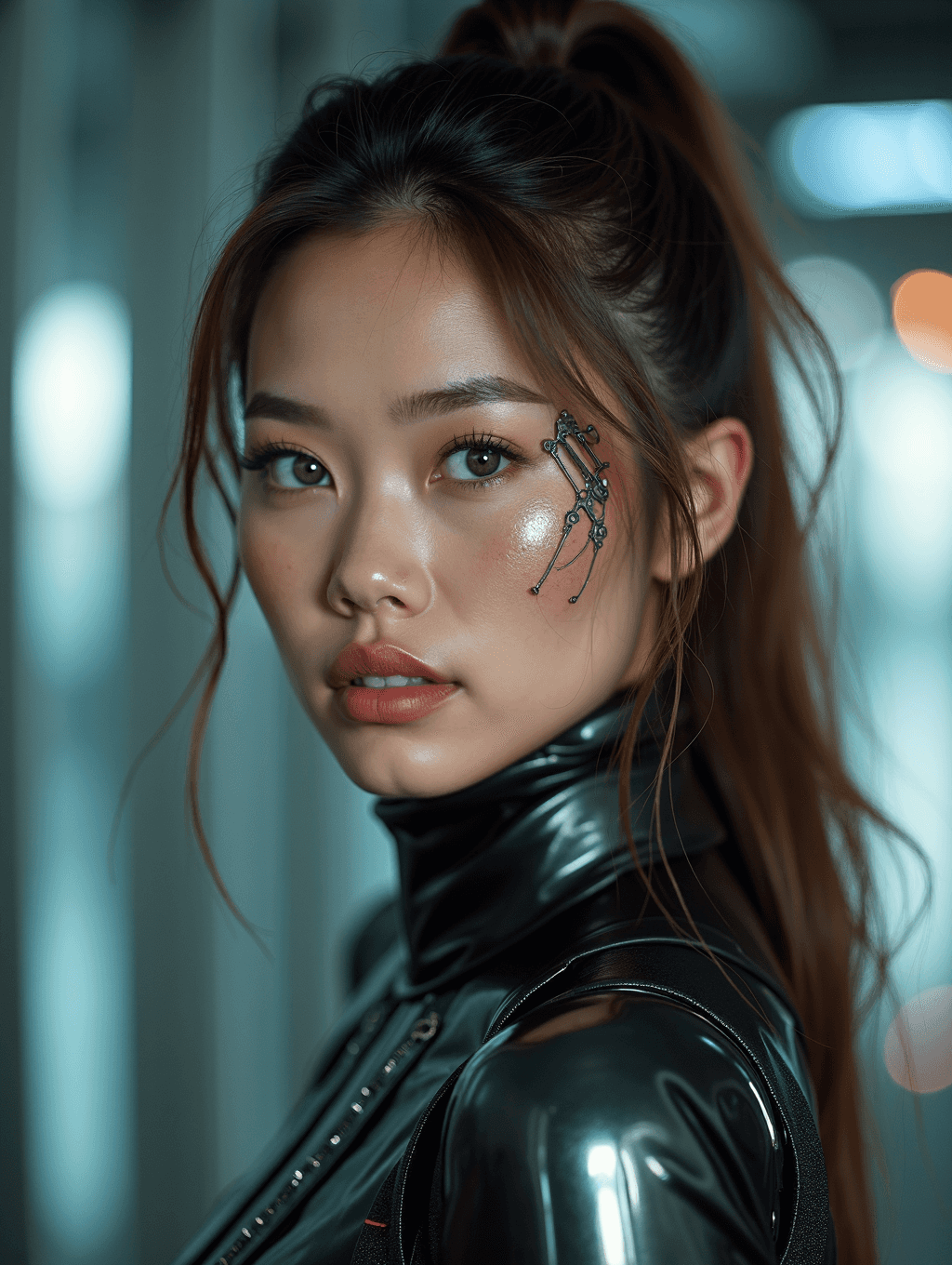
Input: A plain selfie of a young woman with dark hair pulled back, wearing a casual t-shirt against a blank wall. The result looks similar to the image at the top of this page.
Her hair stays pulled into a high ponytail, but a thin mechanical inlay now runs down one side of her face: small metal rods and jointed pieces sit where an eyebrow and cheekbone would be, catching light like polished steel rather than skin. The plain t-shirt is replaced by a glossy black high-collar top with a subtle seam pattern, suggesting armor plating rather than fabric. The background turns into a blurred interior with cool blue-white light and soft orange highlights, the kind of setting a sci-fi film would use for a tech corridor. Her expression and hair color stay close to the original, so she's still recognizable, and the cyborg detail reads as an implant near the eye rather than a full metal face. This is a lighter cyborg look rather than a full robot body; ask for 'full metal plating, exposed joints' in the instruction if you want the more complete robot version instead.
How it works
- 1
Upload a clear photo with your face and shoulders visible
A front-on or slightly turned shot works best. The AI needs a clean view of your face and upper body to place panels, joints, and wiring somewhere they'll actually read as robotic.
- 2
The AI adds robotic and cyborg detail
Expect metallic plating worked into the cheek, jaw, or temple, visible mechanical joints, small wiring or rivets, and a glossy, tech-inspired outfit or surface finish layered over the original photo.
- 3
Lighting shifts toward a cool, futuristic tone
The scene usually gets pushed toward blue and teal light with soft background bokeh, the kind of lighting sci-fi photography uses to sell a tech setting.
- 4
You get back one styled image
The result is a single photo with the robot or cyborg treatment applied. Edit the instruction and rerun it if you want more or less machine and a different mood.
Use cases
Planning a robot or cyborg costume
See a rough version of the look on your own face before committing to makeup, props, or a costume order for a party or convention.
Sci-fi themed social posts
Post a robot or cyborg version of yourself for a themed feed, a movie release, or just for the novelty of it.
Character concepts for a story or game
Writers and game designers building a cyborg character can turn a reference photo into a quick visual starting point instead of sketching from scratch.
Profile pictures with a tech edge
Use it for a gaming handle, a tech-themed account, or any profile that wants a machine aesthetic without a full photoshoot.
Tips for better results
- Use a well-lit, front-facing photo so the AI has a clean base for placing panels and joints.
- Keep the background simple. A busy background competes with the mechanical detail the AI is trying to add.
- Be specific in the instruction: 'subtle cyborg implant near the eye' gives a very different result from 'full metal robot body'.
- Check the final image for odd hands, seams, or wiring that doesn't connect logically before you post or print it.
- If the result looks more human than robotic, rerun it with a clearer instruction naming the exact parts you want mechanical.
Limitations
This is a generative edit, not a real robotics render, so it invents plating, wiring, and joints rather than simulating an actual mechanical build. Faces, hands, and outfit details can shift more than expected between runs, so check the result before using it anywhere that needs an exact likeness. It works best on a single clear subject; group photos tend to produce a less consistent robot look across everyone in frame.
Frequently asked questions
Does this turn me into a real robot?
No. It's a photo edit that adds a robotic or cyborg look to your picture, metallic panels, joints, and a tech-lit scene, but it's for costume ideas and creative photos, not any real mechanical build.
Can I control how much of my body becomes robotic?
Yes. The instruction is editable, so you can ask for a small cyborg detail like a metal eye implant, or push it further toward a full plated robot body.
Will I still look like myself in the result?
Usually, especially with lighter cyborg edits. Full robot transformations that cover most of the face and body naturally leave less of the original likeness visible.
Can I upload more than one photo?
Yes, but all the images in one run are combined into a single result, so a second image works best as a reference, such as a robot design whose plating you like. To compare several looks, run each photo separately; each run uses credits.
Does it work on full-body photos, not just headshots?
Yes, and a full-body photo gives the AI more room to add joints, panels, and armor-style clothing across your whole outfit rather than just the face.
Why does the background change too?
The lighting and setting usually shift toward a cooler, tech-inspired look because that's what sells the sci-fi feel. If you want your original background kept, mention that in the instruction.
Plans start at $9 a month. See pricing