Text Sentiment Analyzer
Upload a photo containing text and get a plain read on its tone, sentiment, and intent.
What the Text Sentiment Analyzer does
Signs, screenshots, handwritten notes, and printed messages carry a tone that's not always obvious from the words alone. This tool reads any visible text in a photo and breaks down its emotional register: positive, negative, neutral, sarcastic, or somewhere in between, plus notes on formality and any language that seems designed to persuade rather than inform. It's built for anyone trying to gauge intent behind a message, a marketing sign, or an ambiguous text screenshot, not just extract the words. Add context in the details box (who wrote it, who it's for) and the read gets more useful, since the same sentence can land differently depending on who's saying it to whom.
See a sample result
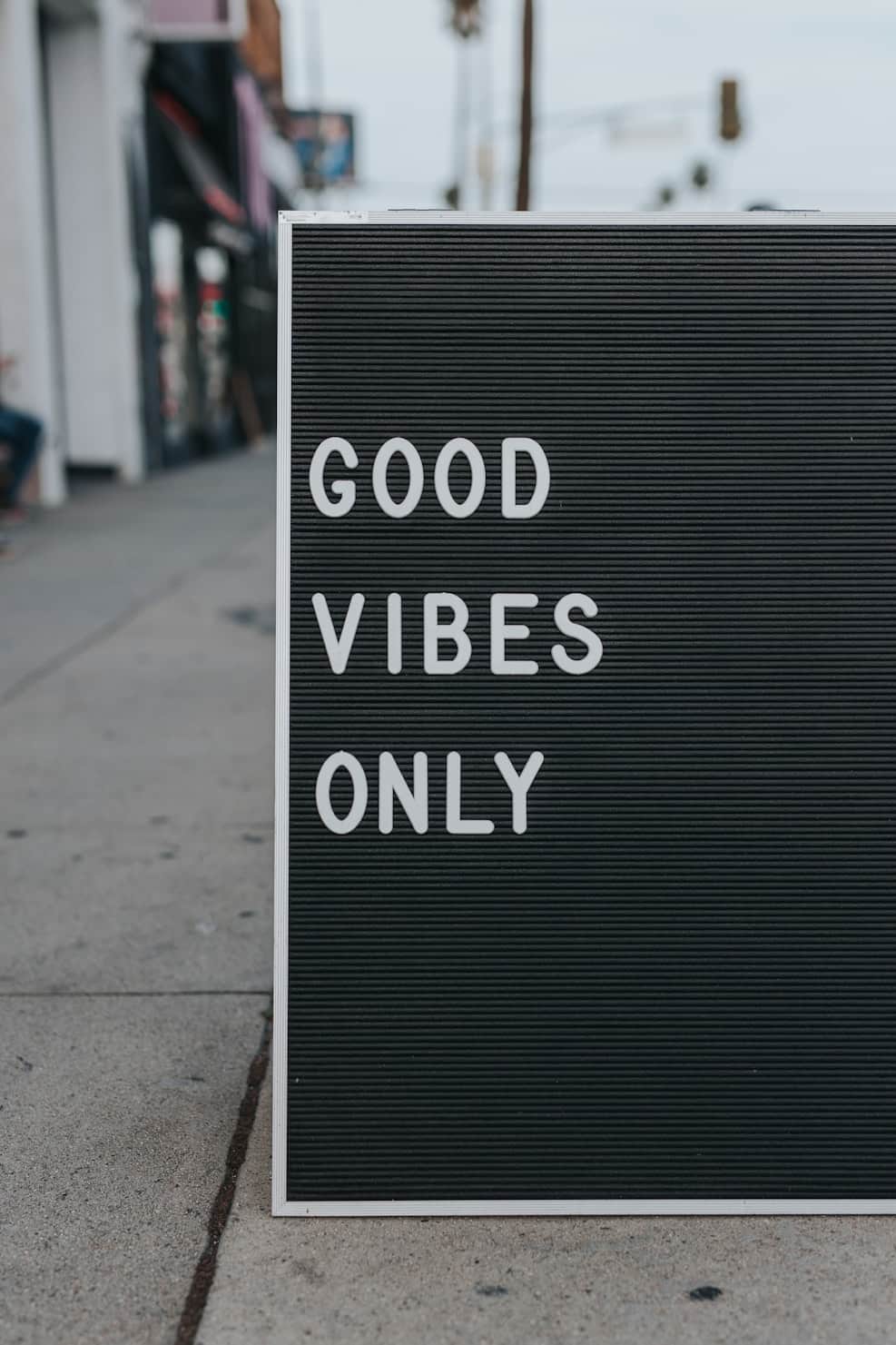
Input: A photo of a black letter board sign on a city sidewalk, propped outside a storefront, reading 'GOOD VIBES ONLY' in large white capital letters, with a blurred street and shopfronts in the background.
- Positivity88%
- Formality12%
- Sarcasm likelihood4%
The text reads as unambiguously positive and casual in tone, the kind of phrase you'd expect outside a coffee shop, yoga studio, or boutique rather than on any kind of formal notice.
'Good vibes only' functions less as a literal instruction and more as a mood-setting slogan, informal, upbeat, and a little playful. There's no sarcasm or hidden negative undertone here; the phrasing is a genuine, if slightly clichéd, attempt at a welcoming tone, the kind of message meant to be read quickly and smiled at rather than analyzed. The all-caps formatting on a sandwich-board style sign is common for storefronts trying to catch a passerby's eye rather than convey formal information.
Worth noting: sentiment like this depends entirely on context that a photo can't fully capture, like whether the business behind it lives up to the sign. Read on its own, the text is simply a short, friendly, low-effort attempt at setting a positive mood for anyone walking by.
How it works
- 1
Upload a photo with legible text
Screenshots, signs, handwritten notes, and printed pages all work, as long as the text is in focus and not too small to read clearly.
- 2
The AI extracts the text and reads it for tone
It reads everything visible, then assesses overall sentiment, emotional tone, formality, and any sarcasm, humor, or persuasive language it picks up on.
- 3
Add context about the situation
Mention who wrote the text and who it's addressed to in the details box. A blunt message reads differently between coworkers than between old friends.
- 4
Get sentiment scores and a written breakdown
You get a short explanation of the tone and intent, plus 0 to 100 scores across categories like positivity and formality, so you can see the overall read at a glance.
Use cases
Read the tone of an ambiguous text message
Screenshot a confusing text from a friend, coworker, or date and get a second opinion on whether it reads as genuinely upset, joking, or neutral before you reply.
Check the tone of marketing or signage copy
Small business owners can photograph a sign, menu, or flyer draft and see whether the wording lands as warm and inviting or accidentally stiff and formal.
Study tone in customer messages or reviews
Photograph a printed customer note or screenshot of feedback to get a read on the underlying sentiment before deciding how to respond.
Analyze tone in old letters or handwritten notes
Read the emotional register of handwritten letters, cards, or journal pages you're revisiting, useful for personal archives or family history projects.
Tips for better results
- Make sure the text is in sharp focus; blurry or low-resolution photos lead to misread words and a less reliable tone assessment.
- Include the whole message in frame; a sentence cut off mid-thought can flip how the tone reads.
- Mention who wrote the text and who it's for in the details box, since relationship and context shape tone heavily.
- For handwriting, angle the photo straight-on and avoid glare, which helps the tool extract the words accurately in the first place.
- If a message could be sarcastic, ask directly in the details box; the tool will call out where sarcasm is likely versus genuine.
Limitations
This tool reads text the way it appears in a photo, and any errors in extracting the words (a smudged letter, an unusual font, glare on glass) can throw off the tone it reports, so check the extracted text against the original for names, numbers, or anything important before relying on it. Sentiment is also read from words and formatting alone; it has no access to tone of voice, the relationship between the people involved, or events outside the photo, all of which shape how a real message should be understood. Treat the result as one informed read, not a verdict on what someone meant.
Frequently asked questions
Can it tell if a text message is sarcastic?
It will flag likely sarcasm based on wording, punctuation, and contrast between what's said and how it's phrased, but sarcasm often depends on context outside the photo, so treat the flag as a hint rather than a certainty.
Does it work on handwritten notes, not just typed text?
Yes, as long as the handwriting is legible enough to read. Messy handwriting increases the chance of a misread word, which can shift the tone reading.
What if the photo has text in more than one language?
It can attempt to read and assess tone in multiple languages present in the same photo, though nuance like idioms and slang carries less reliably across languages than in the original.
Can it analyze the sentiment of a whole screenshot conversation?
Yes, if all the messages are visible and legible in one photo, it will read the exchange as a whole and note how the tone shifts across it if relevant.
Will it correct spelling or grammar in the text it reads?
No, it extracts and analyzes the text as written. If you need the exact wording corrected or cleaned up, that's a separate task from sentiment analysis.
Plans start at $9 a month. See pricing