AI Young Filter
See a younger-looking version of your own face, generated from a current photo.
What the Age Regression does
You've probably wondered what you'd look like with a few less years on your face, without digging through old photo albums to find out. Upload a current photo and this young filter generates a younger-looking version: smoother skin, softer features, and a fuller, more youthful shape to the face, while trying to keep you recognizable. It's a generative edit built for fun, curiosity, and social content rather than any scientific prediction of your actual younger self. You can steer it with a plain instruction, like asking for a specific number of years or a particular feature, and each run gives you back one styled image to compare against the original.
See a sample result
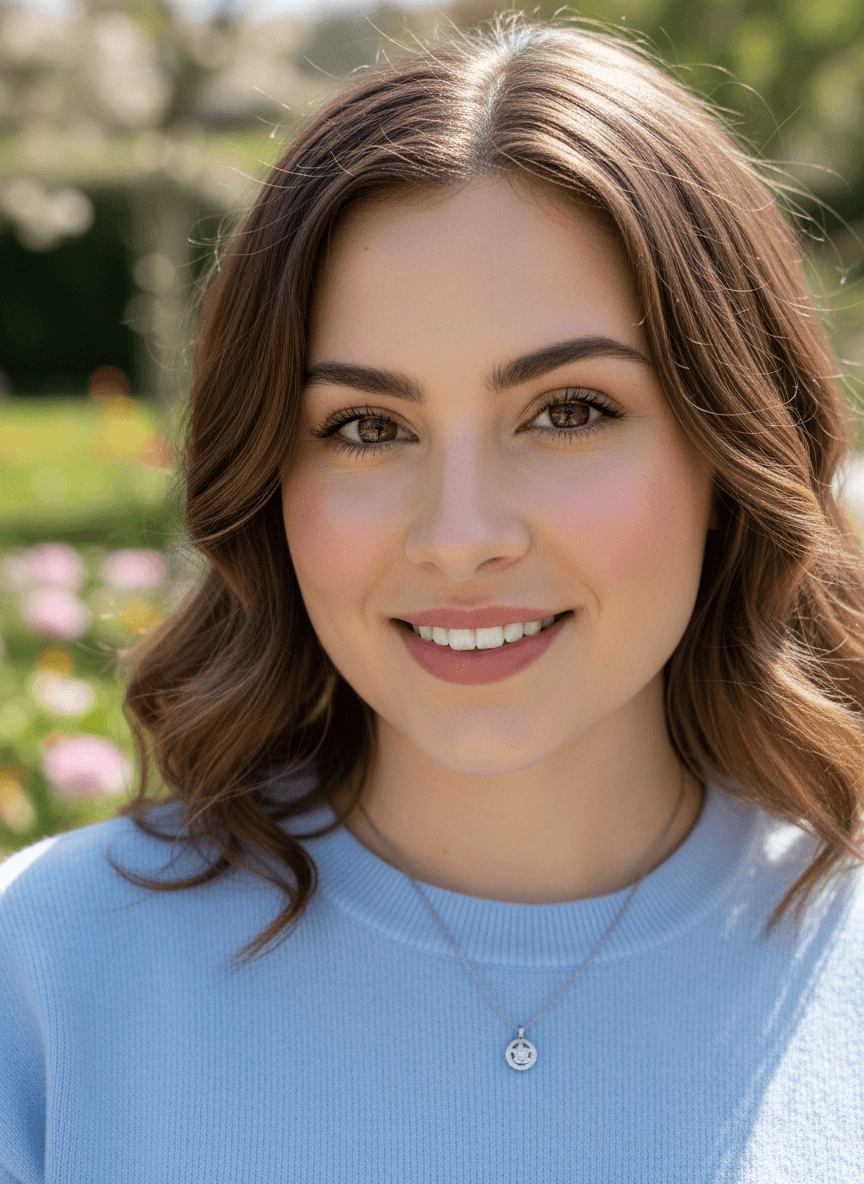
Input: A casual outdoor photo of a woman in her late thirties with fine lines around the eyes and mouth, shoulder-length wavy brown hair, a light blue sweater and a small pendant necklace, photographed in a sunny garden. The result looks similar to the image at the top of this page.
The result softens the fine lines around her eyes and mouth and evens out her skin tone, giving her a smoother, more rested look consistent with someone roughly a decade younger. Her cheeks read slightly fuller, her jawline a touch softer, and her hair keeps its original color and style so the change reads as youthfulness rather than a different person. The outdoor lighting and background stay close to the original photo, and her smile and eye shape carry over, which is what keeps her recognizable. The necklace and sweater came through, but the pendant's shape and a few flyaway hairs were redrawn, and her smile now shows more teeth than in the original. Check those details before you post it.
How it works
- 1
Upload a clear, well-lit photo of your face
A front-facing or slightly angled shot with even lighting gives the AI the clearest base to work from. Avoid heavy shadows, filters, or a partly turned-away pose.
- 2
The AI generates a younger-looking version
It smooths skin texture, softens fine lines, and adjusts facial proportions toward a younger appearance, aiming to keep your recognizable features intact.
- 3
Edit the instruction to steer the result
Ask for something specific, like '10 years younger' or 'fuller cheeks, smoother skin', instead of relying on the default, and the AI leans toward that direction.
- 4
You get back one image to compare
The result is a single photo. If the likeness drifts too far or the change feels too subtle, adjust the instruction or try a clearer starting photo and rerun it.
Use cases
Fun social media posts
Post a younger-looking version of yourself for a throwback-style caption or just to see the reaction from friends and followers.
Curiosity about your own face
Wondering what you looked like at a certain age before you have an actual old photo to compare against? This gives a generated guess to look at.
Previewing a style or haircut idea
See a rough sense of how a softer, younger look might pair with a hairstyle or makeup idea you're considering, before making an actual change.
Content for a personal or lifestyle account
Creators building before-and-after or transformation-style content can use it as one input alongside their own photos and commentary.
Tips for better results
- Use a sharp, well-lit, front-facing photo. Blurry or dim source photos give the AI less to work with and produce a less convincing result.
- Keep makeup and accessories simple in the source photo, since heavy makeup or glasses can carry over in unexpected ways.
- Name a specific target in the instruction, like an age range or a feature, rather than leaving it to the default setting.
- If you have credits to spare, compare two runs side by side. Results vary, and one version may keep your likeness noticeably better than another.
- Check hands, jewelry, and background details in the result, since a generative edit can shift small elements you weren't expecting.
Limitations
This is a generative, entertainment tool, not a scientific model of aging or a medical or forensic age-progression system. It doesn't know your actual genetics, health history, or how your face actually changed over time; it estimates a plausible younger look based on common patterns of skin and facial softening, so results are a stylized guess rather than a prediction you should treat as accurate. Lighting, expression, and the sharpness of your source photo all affect how convincing and how recognizable the result is, and results can vary noticeably between runs of the same photo. Only use photos of yourself or of people who have agreed to it.
Frequently asked questions
Is this how I actually looked when I was younger?
No. It's a generated guess based on common patterns of youthful skin and facial features, not a reconstruction from real data about your past appearance. Treat it as a fun estimate, not an accurate record.
Can I control how many years younger it makes me look?
Yes. Edit the instruction with a specific target, such as '10 years younger' or 'early twenties', and the AI adjusts the result toward that direction rather than using the default amount.
Will I still look like myself?
Usually, since the tool aims to keep recognizable features like your eye shape, smile, and general bone structure. Larger requested changes tend to preserve less of the exact original likeness.
Does it work on photos of children?
It's built around adult faces and works best on photos of adults. Results on photos of children are unpredictable and not something the tool is designed for.
Can I upload more than one photo at a time?
You can, but every image in a run is combined into one result, so extra photos act as references rather than separate jobs. To compare different source photos, run each one on its own; each run uses credits.
Why did small details in the photo change, not just my face?
It's a generative edit, so elements like flyaway hair, jewelry, or background details can shift slightly between the original and the result. That's expected behavior, not an error.
Plans start at $9 a month. See pricing