AI Image Analyzer
Upload any photo and get a structured breakdown of its objects, composition, lighting, and mood.
What the Image Analyzer does
Some photos need more than a caption. The analyzer takes an image apart the way a photographer, designer, or researcher would: what's in the frame, how it's composed, what the lighting and color choices are doing, and what mood the whole thing gives off. It's built for people who need more than a one-line caption, photographers reviewing their own shots, designers researching visual style, researchers cataloging images, or anyone who wants a second, more analytical set of eyes on a photo. Upload one image and you get back an organized read covering subject, setting, visible text, composition, and tone, all in one response.
See a sample result
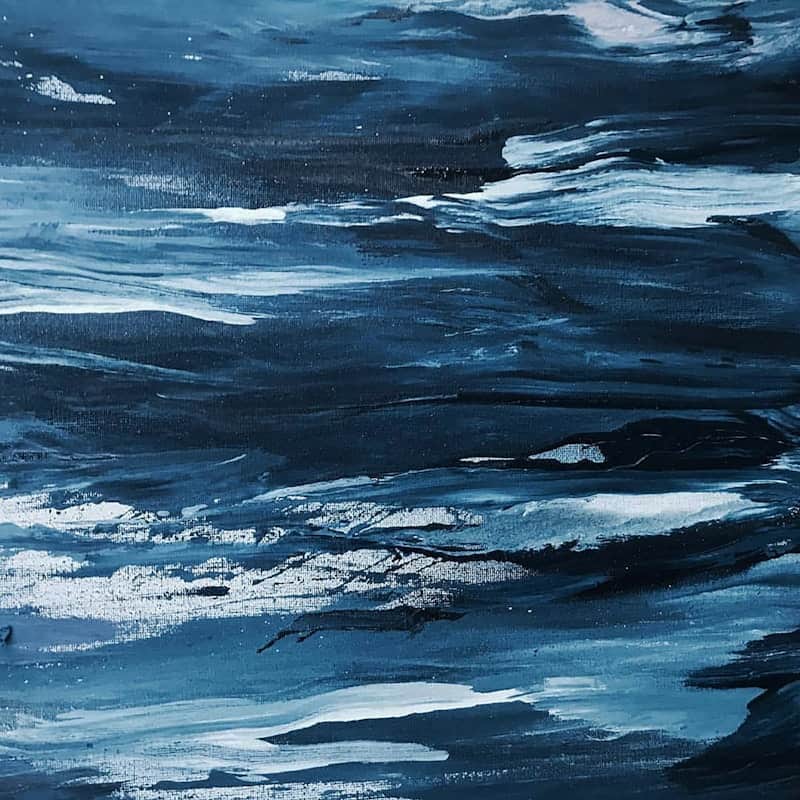
Input: A close-up photograph of a dark blue abstract acrylic painting with heavy, layered brushstrokes and visible canvas texture, resembling rolling ocean waves under a night sky.
Subject and composition
This is a close-up of an abstract acrylic painting rather than a photograph of a real scene. The composition is filled edge to edge with paint, no frame or background visible, giving it an immersive, textural focus rather than a traditional subject-and-background layout.
Color and lighting
The palette sits almost entirely in the blue family, ranging from near-black navy to lighter steel-blue and white highlights where the paint catches light. There's no external lighting to speak of; the brightness variation comes from the paint's own texture and sheen.
Technique and mood
The brushwork is heavy and layered, likely applied with a palette knife or thick brush, creating visible ridges that catch light unevenly. The overall mood reads as calm but restless, closer to storm-tossed water than a still sea.
Visible text
No legible text or markings are visible in the frame.
How it works
- 1
Upload the image you want broken down
Photos, screenshots, artwork, and graphics all work. A higher-resolution image gives the model more detail to work with, especially for small text or fine composition elements.
- 2
The model scans the full frame
It identifies visible objects, people, and elements, reads the setting and context, and notes any legible text or signage present in the shot.
- 3
It evaluates the visual choices
Color palette, lighting, composition, and any photographic or design technique get called out specifically, along with the overall mood or atmosphere the image creates.
- 4
You get one organized response
Everything comes back in a clear, structured format, easy to skim for the piece you actually need, whether that's the color analysis or the object list.
Use cases
Reviewing your own photography
Get a second opinion on composition, lighting, and mood before you decide which shots from a shoot are worth editing further.
Researching visual style for a design project
Break down reference images to understand exactly what color palette, composition, or technique gives them a particular feel before applying it to your own work.
Cataloging images for an archive or collection
Generate a consistent, structured description for each image in a set, useful for tagging, searching, or documenting a photo or art collection.
Checking an image before publishing
Confirm there's no unwanted visible text, logo, or object in the frame before you use a photo publicly.
Tips for better results
- Upload the highest-resolution version of the image you have for the most detailed read.
- If you only need one part of the analysis, like the color palette, say so in the details box before you run it.
- For screenshots or graphics with text, make sure the text is sharp enough to be legible in the upload.
- Compare results across a few similar images to spot consistent patterns in your own composition habits.
- Use the mood and tone section as a gut check before publishing an image tied to a specific brand feel.
Frequently asked questions
What does this tool actually analyze in an image?
It covers visible objects and people, the setting, color and lighting, composition and technique, mood, and any legible text, all in one organized response rather than a single caption.
Can it read text inside the image?
Yes, when the text is clearly legible. Small, blurry, or partially obscured text may be missed rather than guessed at.
Is this different from the image describer tool?
Yes. The image describer gives a short, plain-language line and paragraph suited for alt text or captions. This tool gives a fuller, structured breakdown covering composition, technique, and mood.
Does it work on illustrations and paintings, not just photos?
Yes. Digital art, paintings, and illustrations are analyzed the same way, with technique and style called out specifically rather than assumed to be a photograph.
Can it tell me what camera settings were used?
No. It can describe visible effects like shallow depth of field or motion blur, but it can't determine exact camera settings, since those aren't visible in the final image.
Can I ask it to focus on one thing?
Yes. Add a note in the details box before you run it, such as "focus on the lighting" or "list every object on the table", and the analysis leans toward that instead of covering everything equally.
Plans start at $9 a month. See pricing