What the Sexy Lingerie Generator does
A boudoir-style photoshoot usually means booking a studio, a photographer, and a stylist. This tool gives you a faster starting point: upload a photo, describe the lingerie style, color, or setting you're picturing, and it reworks the image into an elegant boudoir-style portrait, complete with soft ambient lighting and a bedroom or studio backdrop. The default instruction asks for a sensual, provocative look in revealing lingerie, so expect a suggestive boudoir image rather than a catalog shot; soften it in the instruction if you want something more modest. It's meant for adults using their own photo, or a photo of someone who has clearly agreed to it, to preview a look or gift idea before committing to a real shoot.
See a sample result
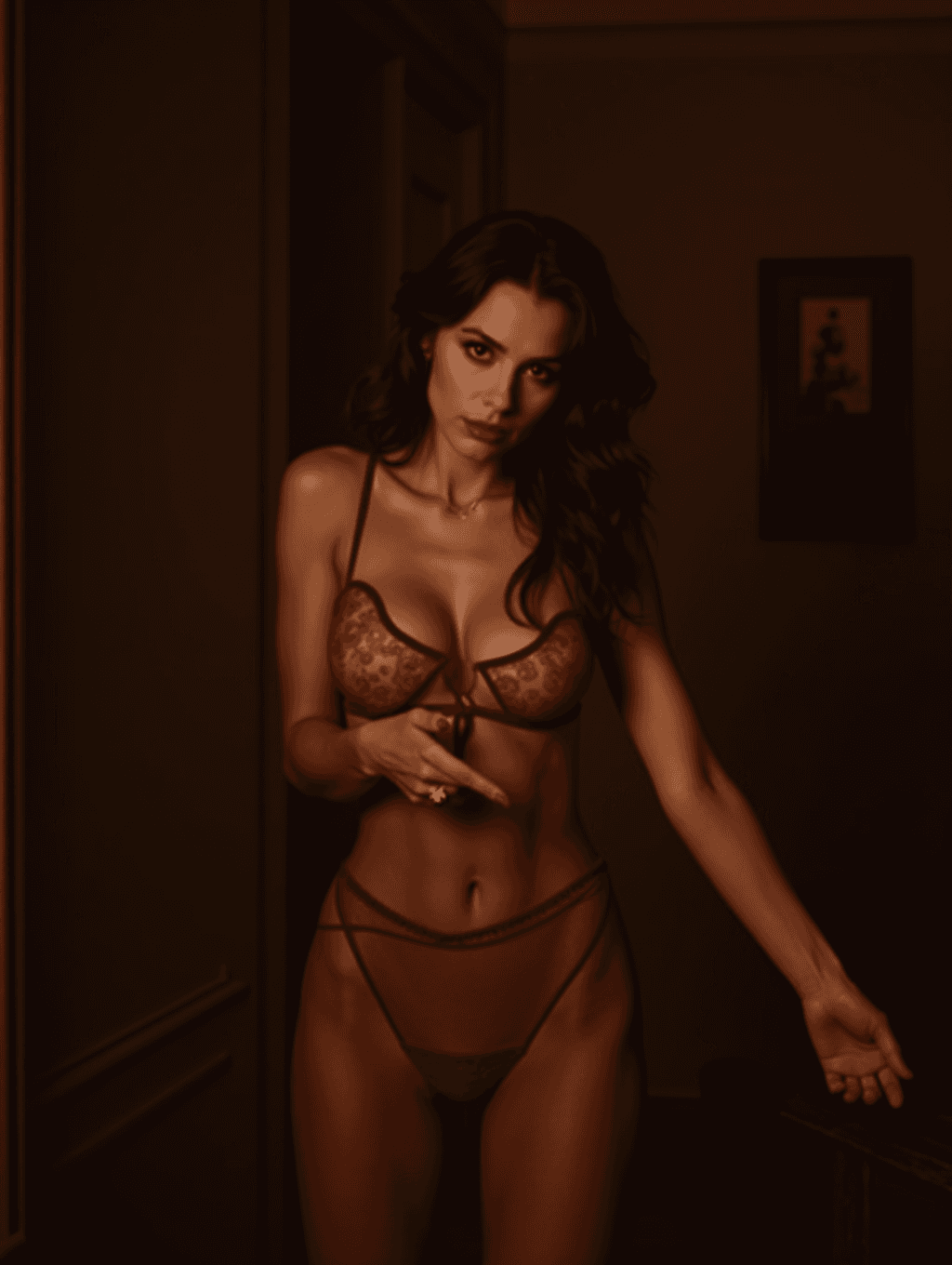
Input: A simple, evenly lit photo of an adult woman with long dark wavy hair in jeans and a sweater, facing the camera against a plain indoor background, with the instruction naming 'burgundy lace, dim hallway light'. The result looks similar to the image at the top of this page.
The photo becomes a dark, moody boudoir portrait. The sweater and jeans are replaced by a sheer burgundy lace bra and matching high-cut briefs, and red lipstick has been added. The setting is a dim, wood-paneled hallway with a small framed picture on the wall, lit by a single warm source that leaves the edges in shadow. The pose changed completely: one hand is raised to the chest and the other arm reaches out to the side, with hair falling loosely over one shoulder.
What to check: The AI drew the whole body and pose, so proportions and hands are invented and can look slightly off. The face is close to the source but not exact. The sheer fabric makes this more revealing than a catalog shot, so ask for opaque fabric in the instruction if that matters to you.
How it works
- 1
Upload a clear, well-lit photo of yourself
A front-facing photo with even lighting gives the tool the clearest starting point for the lighting and pose changes it makes.
- 2
Describe the style, color, or setting you want
Name a lingerie color, fabric, or mood, like 'deep red lace, warm bedroom light,' and the result follows that direction instead of a single fixed look.
- 3
The AI reworks lighting, wardrobe, and setting
It adjusts the outfit, ambient lighting, and background to match a boudoir photoshoot aesthetic. The default look is sensual and revealing; name a softer style in the instruction if you prefer.
- 4
Review and download the result
Check the face and hands, since generative edits can shift small details, then save the image or try another instruction for a different mood.
Use cases
Previewing a boudoir photoshoot idea
See a rough sense of a lingerie color, style, or lighting mood before booking a real photographer or buying an outfit.
A personal or partner gift concept
Create a tasteful, styled image as a private gift idea for a partner, using your own photo as the base.
Testing a color or style before shopping
Compare a few lingerie colors or fabrics on your own photo to get a sense of which one suits a look you have in mind before buying.
Creative or artistic photography reference
Photographers and stylists use it to rough out lighting and wardrobe concepts before a paid shoot with a model.
Tips for better results
- Only upload your own photo, or a photo of someone who has clearly given permission for this kind of edit.
- Use a photo with even, front-facing lighting for the most natural-looking result.
- Be specific in the instruction box about color and mood, like 'black lace, candlelight,' rather than leaving it blank.
- Check the face, hands, and any fine wardrobe detail after generating, since generative edits can shift these.
- Try a couple of lighting descriptions (warm bedroom light versus soft daylight) to compare moods on the same photo.
Limitations
This tool is for adults only. Only upload a photo of yourself, or of someone who has clearly and knowingly agreed to this kind of image being made of them; never upload a photo of someone without their consent, and never a photo of a minor. Results are suggestive, adult-oriented AI images, not photographs of a real shoot, and generative edits can shift small details like faces, hands, or fabric patterns, so review the result before using it.
Frequently asked questions
Whose photo am I allowed to use with this tool?
Only your own photo, or a photo of another adult who has clearly agreed to it. Never upload a photo of someone without their consent, and never a photo of a minor.
Will the result look explicit?
It's meant to be suggestive, not explicit: lingerie, mood lighting, and a boudoir setting, with no nudity requested. The default instruction does ask for revealing, provocative styling, and results can include sheer fabric, so treat every output as adults-only and edit the instruction for a more modest look.
Can I choose the lingerie color or style?
Yes, describe the color, fabric, or mood you want in the instruction box, and the result will follow that direction instead of a single default look.
Can I change the background or setting too?
Yes, mention the setting you want, like a bedroom, a studio backdrop, or soft daylight, alongside the lingerie description.
Why does the face sometimes look slightly different after generating?
This is a generative edit, not a filter, so it can shift fine details like facial features. Review the result and try again with a clearer source photo if needed.
Can I upload more than one photo at a time?
Yes, the tool accepts multiple images, which can help if you want to reference a specific pose or outfit alongside your main photo.
Plans start at $9 a month. See pricing