Impressionist Effect
Turn a photo into a soft, painterly impressionist scene with visible brushwork and warm light.
What the Impressionist Effect does
A sharp photo and a soft impressionist painting read very differently, and this tool moves your photo toward the second. It repaints the image with visible brush texture, softened edges, and the loose, light-focused look associated with Monet-era impressionism, favoring atmosphere and color over crisp detail. You upload a photo and get one repainted version back, and the instruction box lets you push the mood toward a specific palette, season, or setting. It works well on portraits, landscapes, and outdoor scenes with a clear subject and some natural light to work with.
See a sample result
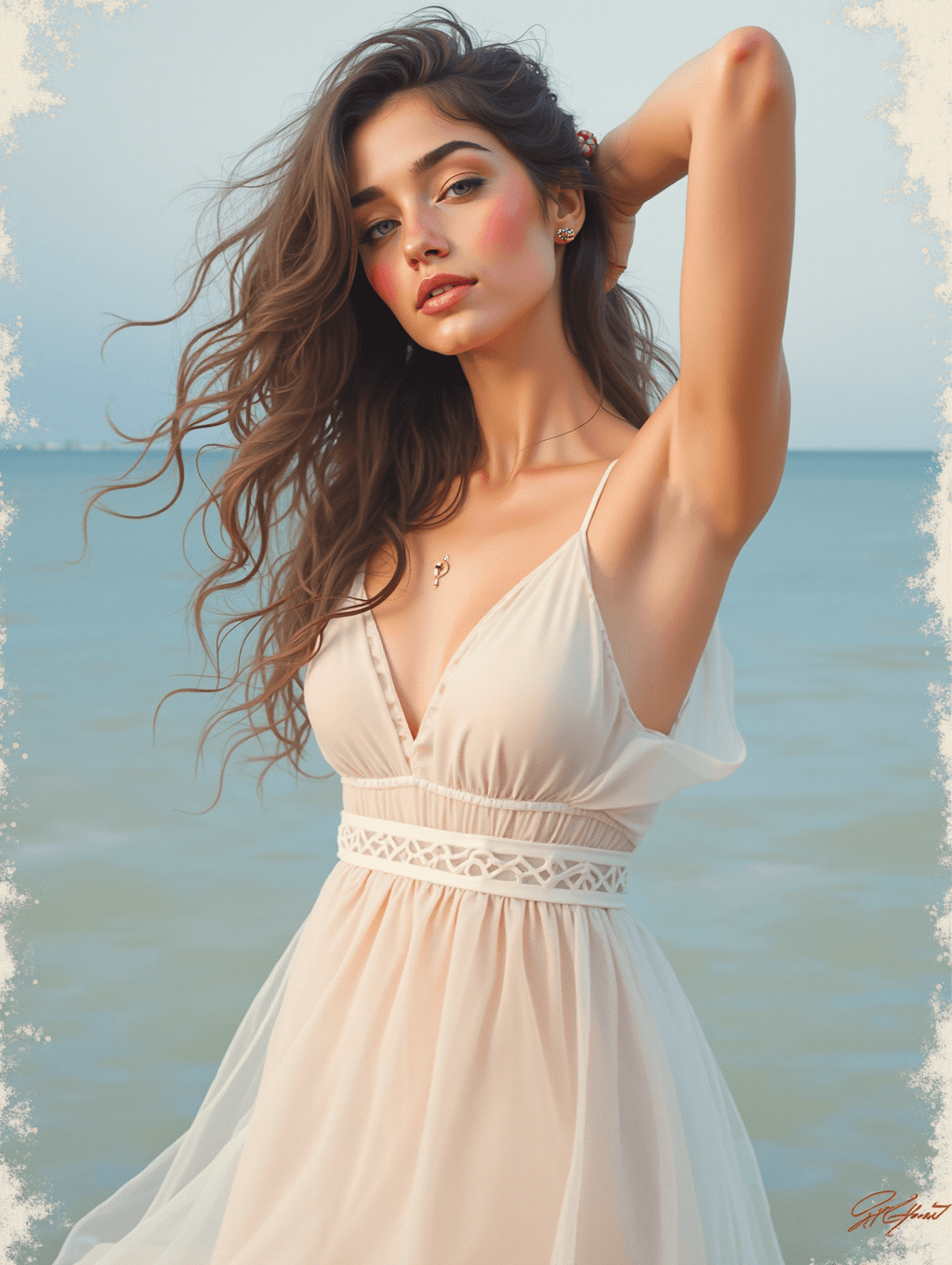
Input: A candid golden-hour photo of a woman standing at the edge of the sea, one arm raised to hold back windblown hair, wearing a light, flowing sundress, with calm water and a pale sky behind her. The result looks similar to the image at the top of this page.
What changed
The photo comes back as a soft, warm painting: blended skin tones with rosy cheeks, loose waves of hair with some painterly strands, a creamy dress, and a calm blue-green sea under a hazy sky. A torn, aged-paper border frames the whole image.
Things to check
- It's smoother than classic impressionism. The default gave a polished digital painting with only light brush texture, not the broken dabs of color Monet is known for. For a stronger effect, ask for "loose, visible brushstrokes, dabs of color, soft focus" in the instruction.
- An invented signature. A scribbled signature appears in the bottom-right corner. It isn't anyone's real mark; ask for "no signature, no text" or crop it out before printing or sharing.
- The face is idealized. Fuller lips, smoother skin and brighter eyes are common, so compare it with the original if you want it to look like the person.
- The border was added on its own. If you want a full-bleed painting, say "no border".
How it works
- 1
Upload a photo with a clear subject and some light
Outdoor scenes, portraits near a window, or anything with visible natural light give the AI more to work with when building soft, painterly light effects.
- 2
Describe the mood in the instruction
Mention a color palette, time of day, or season, like a golden late-afternoon feel or a cooler seaside tone, to steer the finished painting.
- 3
The AI repaints the photo
It replaces sharp photographic detail with visible brush-like texture, softened edges, and stronger emphasis on light and color over fine detail, aiming for a hand-painted look.
- 4
Check faces and small details
Impressionist softening blurs fine detail on purpose, so look at faces, hands, and any text in the frame to make sure the result still reads the way you want.
Use cases
Printed wall art
Turn a favorite travel, wedding, or family photo into a painting-style print instead of a straight photo enlargement.
Social and profile images
Use an impressionist version of a photo as a distinct profile picture or cover image with a softer, artistic look.
Gift art from a memory
Turn a meaningful photo, like a wedding or vacation moment, into painting-style art for a gift without commissioning a painter.
Blog and website headers
Use a softened, painterly version of a photo as a header image for a lifestyle or travel blog that wants a warmer visual tone.
Tips for better results
- Use a photo with visible natural light, like outdoor sun or a bright window, since impressionism leans heavily on light and color.
- Name a color mood or season in the instruction, like autumn tones or a cool morning palette, for a more distinct result.
- Avoid photos where fine text or small objects matter, since the painterly softening blurs detail on purpose.
- Try a landscape or a person outdoors first; busy indoor scenes with lots of small objects paint less cleanly.
- Check faces after generating, since softened brushwork can shift small features slightly from the original photo.
Frequently asked questions
Will the person in my photo still be recognizable?
Generally yes, since the AI keeps the overall face shape and pose, but impressionist softening blurs fine detail on purpose, so check faces after generating.
Can I choose a specific color palette or artist's style?
Yes, describe it in the instruction box, for example a warmer Monet-style palette or a cooler, moodier tone, and the AI leans toward that direction.
Does this work on photos that aren't outdoors?
It can, but scenes with visible natural light and fewer small objects paint more cleanly than a busy indoor photo with lots of detail.
Can I upload more than one photo?
You can add more than one image, for example combining two photos into one painted scene, but they merge into a single result. Each run uses credits.
What size does the painted image come out in?
It follows the shape of your original photo rather than a fixed canvas size, so crop or resize it afterward if you're printing it.
Why does the result look softer than I expected?
Impressionist style intentionally trades sharp detail for light and color, so a softer, less defined look is the point rather than a flaw. Ask for a lighter touch in the instruction if you want more detail retained.
Can I use this on old or lower-quality photos?
Yes, and the softened, painterly style can actually help hide grain or blur that would stand out in a sharp photo, though very dark or heavily blurred images still limit how much detail the AI has to build from.
Plans start at $9 a month. See pricing