AI Skin Analysis
Upload a close-up photo and get a read on your skin's texture, hydration, and visible concerns.
What the Skin Health Analyzer does
Skin can look fine in the mirror and then read completely differently up close under even light, which is where most people miss things like dry patches, uneven texture, or early redness. Upload a clear, close-up photo and this tool describes what it sees: texture, apparent hydration, tone evenness, and any visible concerns like flaking, redness, or blemishes. It's built to describe your skin's current visible condition and suggest general skincare directions, not to diagnose anything. You get a written breakdown plus scores across a few categories, useful for tracking how your skin looks over time or deciding what kind of product to look into next. Any spot that's changing, growing, or worrying you belongs in front of a dermatologist, not an app.
See a sample result
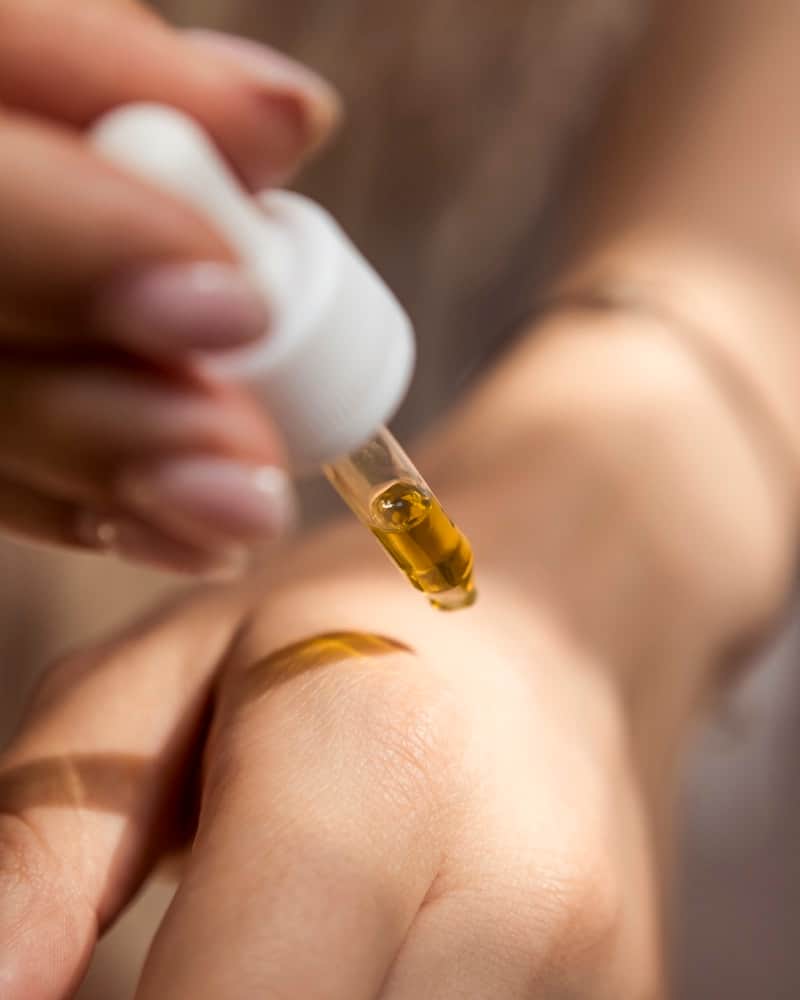
Input: A warm, softly lit close-up of the back of a hand while another hand, with pale pink nails, squeezes a drop of golden oil from a dropper onto it. A streak of oil already sits near the knuckles, and much of the frame is in soft focus.
- Hydration66%
- Texture evenness72%
- Tone evenness80%
- Image clarity for skin read45%
Texture and tone
The back of the hand shows the fine crosshatch texture that's normal for that area, and the tone looks even, with no visible redness, spots or discoloration. The warm light and shallow focus soften detail, so small texture changes wouldn't show here.
Hydration
There's no visible flaking or rough patches, and the skin has a soft sheen, though some of that may be the oil already applied. Hydration reads as normal, but with oil on the skin and this lighting, treat that as a rough read.
Visible concerns
Nothing that looks like irritation, breakouts, or unusual marks is visible in the in-focus area.
General direction
For hands, a regular hand cream after washing and sunscreen on the backs of the hands do more over time than any single product. For a clearer read, photograph bare skin with no product on it, in even daylight, with the area you care about in sharp focus.
This is a description of visible surface condition only, not a skin diagnosis; a dermatologist can properly assess anything that concerns you, especially any mole or spot that's new or changing.
How it works
- 1
Upload a clean, close-up photo
Bare skin, no makeup or filters, in even daylight near a window works best. Get close enough that texture and tone are visible, but keep the shot in focus rather than an extreme macro blur.
- 2
The AI reads texture, tone, and visible concerns
It looks at surface texture, evenness of tone, visible dryness or oiliness, and any redness, flaking, or blemishes that show up in the photo, and describes what it's actually seeing.
- 3
Add context in the details box
Mention your skin type, a product you're using, or a specific area you're concerned about, and the analysis will speak to that instead of giving a generic overview.
- 4
Read the breakdown and general suggestions
You get a written description of your skin's current visible condition, scores across categories like hydration and texture, and general skincare directions, not a diagnosis or treatment plan.
Use cases
Tracking how your skin changes over a season
Take a similar close-up photo every few weeks and compare the written descriptions and scores to see whether dryness, texture, or tone is actually shifting, not just how it feels that day.
Deciding what kind of product to look into
Get a general sense of whether your skin reads as dry, textured, or uneven before you go shopping, so you're looking for the right category of product instead of guessing.
Checking in after a change in routine
After switching a cleanser or adding a new serum, photograph the same area and see whether the described texture and tone read differently than before.
Getting a second opinion before a dermatologist visit
Use the written description of visible texture, tone, and concerns as notes to bring to an actual appointment, not as a replacement for one.
Tips for better results
- Shoot in daylight near a window rather than under yellow indoor bulbs, which can shift how tone and redness read.
- Go bare-faced or bare-skinned in the photographed area; makeup, lotion sheen, or filters change what's visible.
- Photograph the same spot each time if you're tracking changes, so comparisons are meaningful.
- Get close enough that texture is visible without the photo blurring out of focus.
- Mention any product you're using or considering in the details box for more relevant suggestions.
Limitations
This describes visible surface condition in one photo; it is not a diagnosis and doesn't detect medical skin conditions. Lighting, camera quality, and skincare products on the skin at the time of the photo all affect the result. See a dermatologist for any mole, spot, or patch that's new, changing, itching, or bleeding, and for any ongoing skin concern.
Frequently asked questions
Can this diagnose a skin condition like eczema or acne?
No. It describes what's visible in the photo, like texture and tone, but it doesn't diagnose medical conditions. See a dermatologist for anything that looks like an active skin condition.
I have a mole that looks different than it used to. Can this tell me if it's a problem?
No, and please don't rely on it for that. Any mole or spot that's changing size, shape, or color needs an in-person dermatologist visit, not a photo analysis tool.
What does it actually look at in the photo?
Surface texture, tone evenness, apparent hydration, and visible things like redness, flaking, or blemishes, all just from what's visible in the image you upload.
Will lighting affect my results?
Yes, significantly. Warm indoor lighting can make skin look more flushed or yellow than it is, and harsh overhead light can exaggerate texture. Daylight near a window gives the most consistent read.
Can I track my skin over time with this?
Yes, that's one of the more useful ways to use it. Photograph the same area under similar lighting periodically and compare the written descriptions and scores.
Does it recommend specific skincare products?
It suggests general directions, like a hydrating serum or gentle exfoliant, based on what it sees, rather than naming specific brands or products to buy.
Plans start at $9 a month. See pricing