What the Sexy Halloween Generator does
Deciding on a Halloween costume is easier when you can actually see it on yourself first. Upload a photo and the AI restyles it into a costume look with a Halloween setting: pumpkins, candlelight, and a party atmosphere layered around a flirty, festive outfit. It's built for adults previewing costume ideas before a party, a photoshoot, or a social post, and it aims for revealing-but-not-nude party wear rather than explicit content. It's meant for photos of yourself, or of someone who has clearly agreed to it, not photos of anyone else without their permission. You get back one styled image, and you can steer the costume style and mood with the instruction.
See a sample result
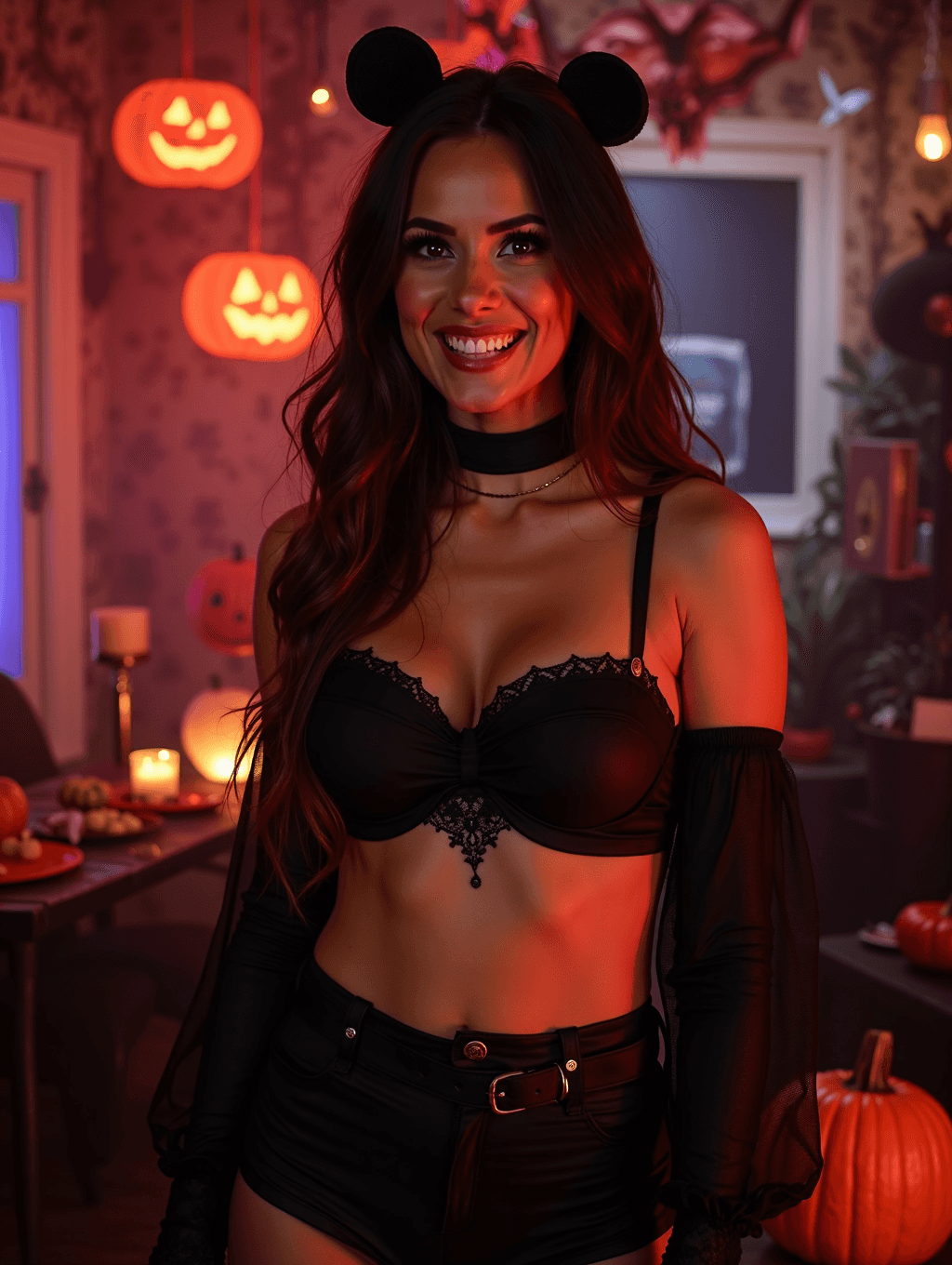
Input: A plain, well-lit photo of a woman with long dark wavy hair, smiling, in a casual top and jeans against a neutral wall. The result looks similar to the image at the top of this page.
Her long dark waves stay, and a round black mouse-ear headband now sits on her head. The casual outfit becomes a black lace bralette, high-waisted black shorts with a belt, sheer black sleeves, a velvet choker and a thin layered necklace. The background is rebuilt into a decorated Halloween scene: carved jack-o'-lanterns glowing on a side table, string lights, candles, and warm orange-red lighting that reads as party lighting rather than daylight. Her smile carries over, though her teeth and makeup were redrawn. The look is revealing, lingerie-style party wear, not nudity; if you want more coverage, say so in the instruction. Small details like jewelry and prop placement are generated by the AI, so treat them as stylistic additions rather than an exact preview of a costume you already own.
How it works
- 1
Upload a clear photo of yourself (or someone who consented)
A front-facing or slightly angled photo with your face and upper body visible gives the AI the clearest base to build the costume and setting around.
- 2
The AI adds costume, lighting, and setting
Expect a themed costume, warm candlelit or jack-o'-lantern lighting, and Halloween props like pumpkins and string lights worked into the background.
- 3
Edit the instruction to steer the tone
Name a specific costume idea, like 'witch costume, moody lighting' or 'cat costume, party background', instead of relying on the default treatment.
- 4
You get back one styled image
The result is a single photo. If the tone feels off, adjust the instruction toward more modest or more playful and rerun it.
Use cases
Previewing a costume before you buy or make one
See a rough version of a costume idea on your own photo before committing to an order or piecing an outfit together yourself.
Halloween party or event posts
Generate a festive, on-theme photo for a party invite, a social post, or a costume contest entry without a full photoshoot.
Trying out a few costume ideas quickly
Run the same photo with a few different instructions, witch, cat, vampire, to compare which costume concept you like best before deciding.
Content for a seasonal or lifestyle account
Creators posting seasonal content can use it to generate Halloween-themed photos as one part of an October content calendar.
Tips for better results
- Only upload photos of yourself, or of someone who has clearly agreed to have their photo used this way.
- Use a well-lit, front-facing photo with a plain background so the costume and setting come through clearly.
- Be specific in the instruction about the costume and tone you want, rather than leaving it to the default.
- Check the result before posting, since generative edits can add props, jewelry, or details you didn't ask for.
- If a result feels more revealing than you intended, rerun it with wording like 'modest costume, less skin shown'.
Limitations
This tool is for consenting adults only. The default look is revealing but not nude, and the image models run safety filters meant to block explicit output. It generates a costume look rather than producing a real photo of you wearing that outfit, so treat the result as a styled preview, not an exact garment or product. Only upload your own photos or photos of people who have agreed to this use; uploading someone else's photo without their permission isn't appropriate. As with any generative edit, faces, props, and small details can shift between runs, and a safety filter can block a result. Never upload a photo of anyone under 18.
Frequently asked questions
Is the result explicit?
It isn't designed to be. The default look is revealing party wear, like the lingerie-style costume in the example, but not nudity, and the image models' safety filters usually block explicit results, though that isn't guaranteed. You can ask for more coverage in the instruction.
Can I use a photo of someone else?
Only if that person has clearly agreed to it. This tool is meant for your own photos or photos of people who have consented, not photos of anyone else without their permission.
Can I make the result more modest?
Yes. Edit the instruction with wording like 'modest costume' or 'less revealing, more coverage' and rerun it, since the costume style responds to what you ask for.
Do I need to already own a costume?
No, that's part of the point. It lets you preview a costume idea on your own photo before you decide whether to buy or make one.
Can I upload more than one photo?
You can, but all images in one run are combined into a single result, so a second image works best as a costume reference. To compare different photos, run each one separately; each run uses credits.
Will it work for costumes other than the default look?
Yes. Name a specific costume, witch, cat, vampire, in the instruction and the AI builds the outfit and setting around that idea instead of the general default.
Plans start at $9 a month. See pricing