Bokeh Effect
Give any photo the soft, glowing background blur usually reserved for expensive camera lenses.
What the Bokeh Effect does
That creamy, glowing blur behind a subject comes from a wide-aperture lens most phone cameras don't have, which is why portraits shot on a phone often look flat next to ones shot on a proper camera. This tool recreates that look after the fact: the image model redraws the photo with the subject in focus and the background turned into soft, rounded light and color, the way an out-of-focus background looks through a fast lens. It's for portraits, product shots, and any photo where a busy or plain background is pulling attention away from the subject. Upload a photo and you get one back with the subject sharp and the background dissolved into soft bokeh.
See a sample result
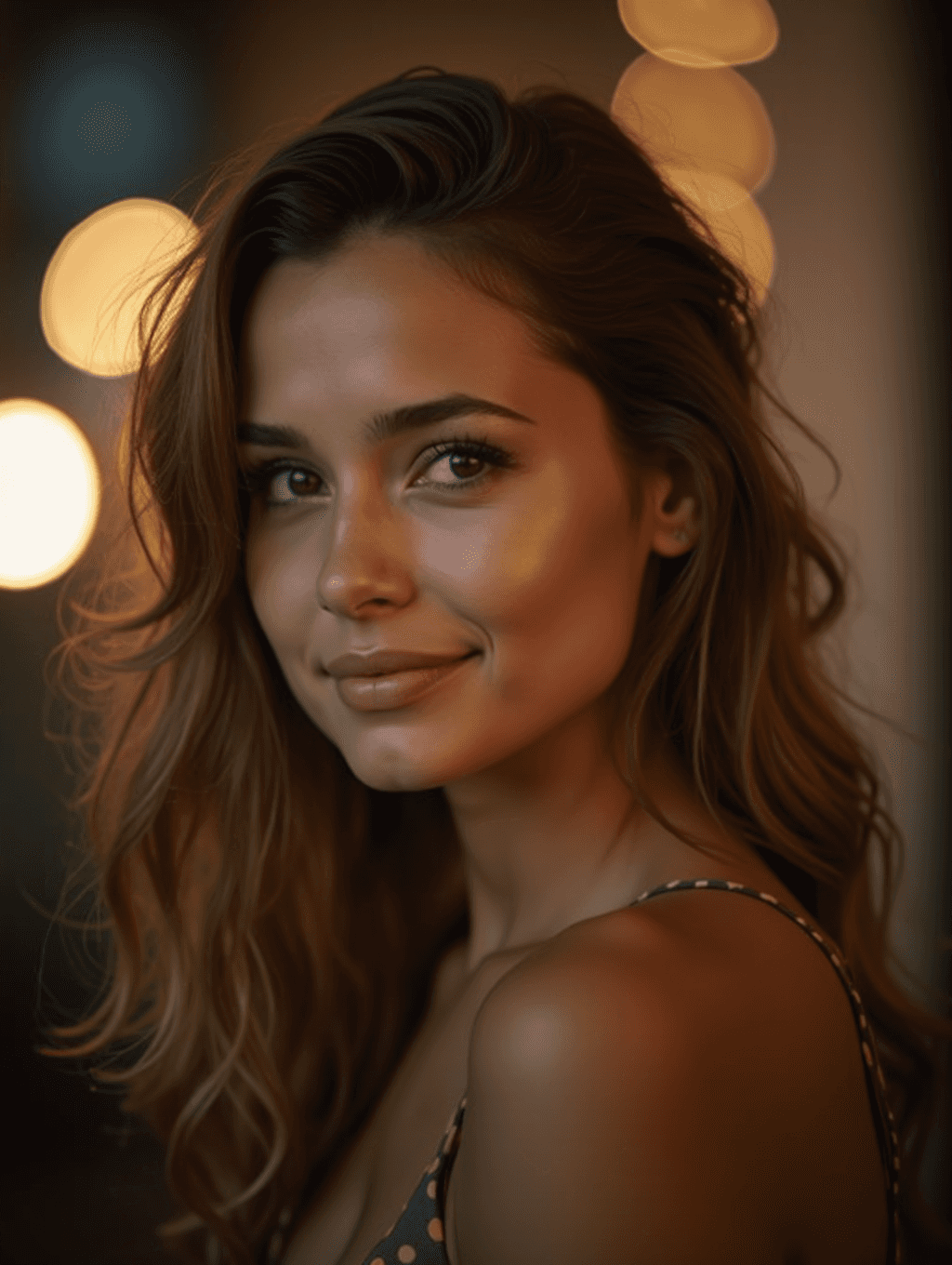
Input: A phone portrait of a woman with long brown hair, smiling gently, shot indoors in a café with warm string lights and shelves sharply in focus behind her. The result looks similar to the image at the top of this page.
Subject
The face, hair, and shoulders stay sharp and the pose is unchanged. Because the whole image is regenerated, skin can come out a touch smoother than the original, so compare the face with your photo before you post it.
Background
The warm string lights in the background were rounded into soft, glowing circles of varying size, layered to look like they're sitting at different distances the way real out-of-focus lights do. The wall and shadow areas around the lights were smoothed into a gentle gradient rather than left sharp and busy.
Overall effect
The warm color temperature of the original shot was kept, so the bokeh reads as a natural extension of the existing lighting rather than an added filter, giving the portrait a softer, more intentional depth-of-field look.
How it works
- 1
Upload a photo with a clear subject
Portraits work best, though product shots and close-up subjects with some separation from the background also work well. The clearer the edge between subject and background, the cleaner the blur.
- 2
The AI decides what stays in focus
It picks the main subject and regenerates everything behind it as out of focus. It's an AI rendering of shallow depth of field, not an optical calculation, so name the subject in the instruction if the photo has more than one candidate.
- 3
Background light gets turned into bokeh circles
Bright points in the background, string lights, streetlights, reflections, are rounded into soft glowing circles, while the rest of the background is smoothed into a gentle blur.
- 4
Download the result
You get back a photo where the subject stays sharp and in focus while the background reads like it was shot with a wide-aperture lens, ready for a profile photo, portfolio, or print.
Use cases
Fixing a busy phone portrait
Phone cameras often keep everything in focus, which can make a background feel cluttered. This isolates the subject the way a dedicated portrait lens would.
Profile and headshot photos
A soft, blurred background keeps attention on the face for a LinkedIn photo, dating profile, or personal website headshot.
Product photos with distracting backgrounds
Small businesses shooting products at home can soften a cluttered background without needing a studio setup or a macro lens.
Turning ordinary lights into a mood shot
Photos with string lights, city lights, or candles in the background can be reworked to make those lights glow the way they would through a wide-aperture lens.
Tips for better results
- Choose a photo where the subject is reasonably separated from the background, since overlapping edges are harder to blur cleanly.
- Photos with small bright spots in the background, lights, reflections, windows, tend to produce the most convincing bokeh circles.
- Avoid photos where the subject is already blurry, since the effect works by keeping the subject sharp against a softened background.
- If the subject's edges look too smoothed after processing, try a version of the photo with a bit more contrast between subject and background.
- For group photos, expect the effect to treat everyone in the closest plane as the subject, so keep the group roughly the same distance from the camera.
Frequently asked questions
Do I need a specific type of camera or lens for this to work?
No. The point of the tool is to add the look a wide-aperture lens produces without needing that lens or camera. Any reasonably clear photo works as the starting point.
Will it blur parts of the subject by mistake?
It aims to keep the subject sharp, but edges around hair, glasses, and loose clothing can come out soft on cluttered or low-contrast photos. It can also subtly change the subject's features, since the whole image is redrawn.
Can I control how strong the blur is?
Yes, through the instruction. Add 'subtle blur, background still recognizable' for a lighter look, or 'very shallow depth of field, large bokeh circles' for a heavier one. The default is a fairly strong portrait-lens look.
Does this work on photos without any background lights?
Yes, plain backgrounds get smoothed into a soft blur even without bright points to turn into bokeh circles, though the glowing-light look is most noticeable when some lights are present.
Is this the same as a portrait mode on a phone?
It aims for a similar result, a sharp subject against a blurred background, but works from a single flat photo instead of using a phone's depth sensor at the time of shooting.
Can I use this on landscape or non-portrait photos?
Yes, though it works best when there's a clear main subject in the frame. Wide scenic shots with no single focal point won't give the effect much to isolate.
Plans start at $9 a month. See pricing